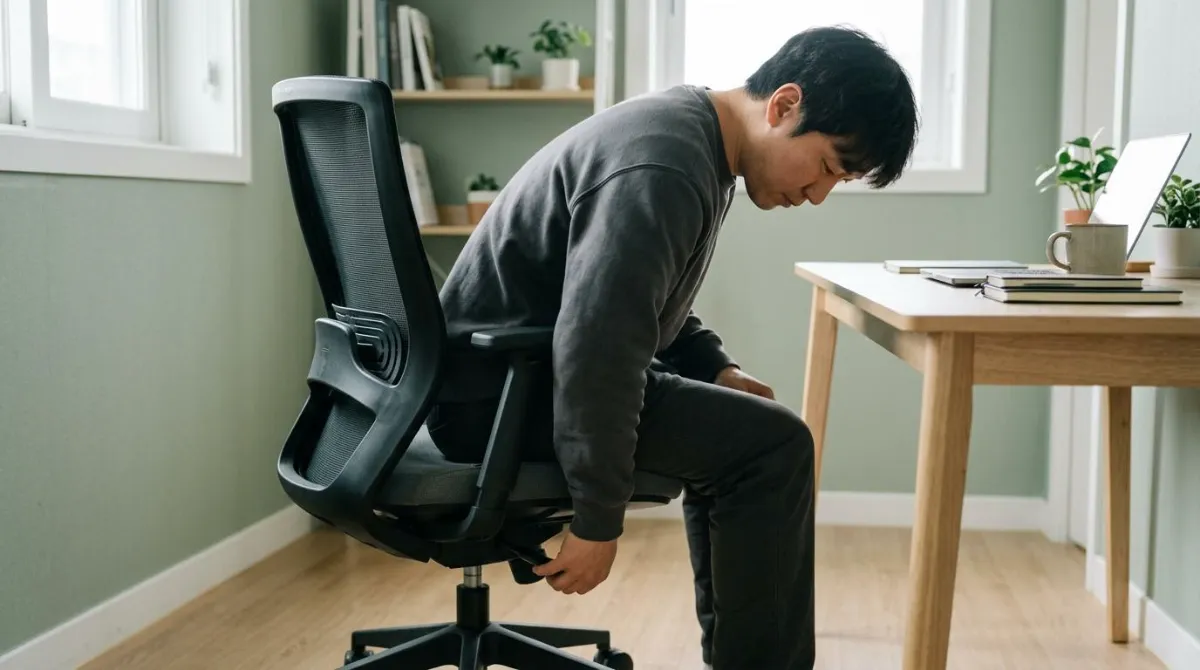
To choose an ergonomic office chair, check fit before price or materials. Six things decide whether a chair can be set up for your body and your desk: seat height, seat depth, lumbar support, recline, armrests and the base. If those adjust far enough for your leg length and your desk height, the chair can do its job.
Below are the published ranges for each part, where those numbers come from, what studies say about chairs and back pain, and how to adjust the chair you buy.
What makes an office chair ergonomic: 6 things to check
Chairs sold as "ergonomic" are designed for a range of people, with no guarantee they will suit you, notes the Canadian Centre for Occupational Health and Safety (CCOHS).4
A chair becomes ergonomic only when it specifically suits a worker's size (body dimensions), their particular workstation, and the tasks that must be performed there.
Canadian Centre for Occupational Health and Safety (CCOHS), Office Ergonomics: Ergonomic Chair
| Part | When it fits | What to check |
|---|---|---|
| 1. Seat height | Feet flat on the floor, no pressure under the thighs | Lowest and highest setting |
| 2. Seat depth | Back supported, seat edge clear of your knees | Seat slider, or the listed depth |
| 3. Lumbar support | The curve sits in the small of your back | Height adjustment |
| 4. Recline | Your back stays supported as you lean | Recline range, tension, lock |
| 5. Armrests | Shoulders relaxed, elbows lightly supported | Height range, desk clearance |
| 6. Base | Stable, rolls easily on your floor | Five legs, casters matched to the floor |
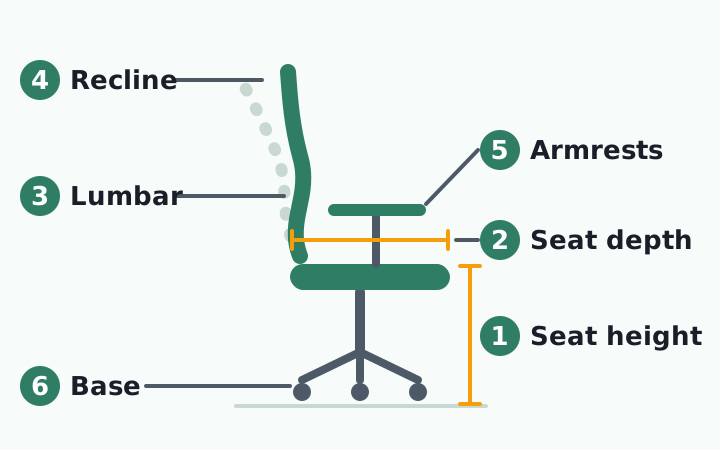
The table combines chair checks from the Occupational Safety and Health Administration (OSHA) and CCOHS.25
Seat height and seat depth: where the numbers come from
| Source | Seat height | Seat depth | Seat width |
|---|---|---|---|
| OSHA purchasing checklist1 | 15-22 in (38-56 cm) | 15-17 in (38-43 cm) | About 18 in (46 cm) or more |
| BIFMA G1-20133 | 14.8-20.2 in (37.6-51.2 cm) | 16.3 in (41.5 cm) or less if fixed | 19.2 in (48.9 cm) or more |
The furniture industry guideline, BIFMA G1-2013, shows its math. In a body-measurement survey of American and European civilians, the height of the back of the knee when seated was 13.6 inches for a 5th-percentile woman and 19.0 inches for a 95th-percentile man. Add 1.2 inches for shoes and you get 14.8 to 20.2 inches.3
One height mechanism rarely covers that whole span, so if you are shorter or taller than average, read the listed seat height range first.3 CCOHS offers a starting point of about one quarter of your height, and calls it only a rule of thumb.4
Seat depth is set by the shortest legs. The guideline takes the 5th-percentile woman's buttock-to-knee length (16.7 inches), subtracts 0.4 inch of clearance, and recommends that a fixed seat be no deeper than 16.3 inches. It quotes the ISO principle that back support is more important than supporting the whole length of the thighs.3 To test it, sit back and check that a clenched fist, about 2 inches, fits between the seat edge and your calves.5 UCLA's ergonomics program gives a similar 1 to 2 inches.7
For width, Cornell University's ergonomics site gives a simple test: the seat should be at least an inch wider than your hips and thighs on each side.6
Lumbar support and recline: what the research shows
With lumbar support, position matters more than presence. BIFMA puts the most forward point of the support 5.9 to 9.8 inches above the seat, and says plainly that this comes from industry practice, not body data. It gives no number for how far the support should stick out, because research does not support one.3 That is why a height-adjustable support is the thing to look for.
| Study | Who and how | Finding |
|---|---|---|
| Andersson et al. 19798 | 38 healthy adults, X-ray | More lumbar support, more low-back curve. Backrest angle had a minor effect |
| De Carvalho et al. 20179 | 28 adults, X-ray | No difference between chair features. Sitting used about 70% of full flexion |
| Wilke et al. 199910 | One 45-year-old man, sensor in a disc | Relaxed ("nonchalant") sitting 0.3 MPa, sitting unsupported 0.46 MPa, standing 0.5 MPa |
| Bashir et al. 200611 | 22 healthy adults, MRI (conference abstract) | Least disc change at a 135-degree trunk-thigh angle |
The popular claim that 135 degrees is the best sitting angle comes from the last row. It was a conference presentation at the Radiological Society of North America, not a full paper, and it compared disc shape on scans, not pain.11 The 135 degrees is the angle between trunk and thighs, not a backrest setting, and it is hard to type from there.
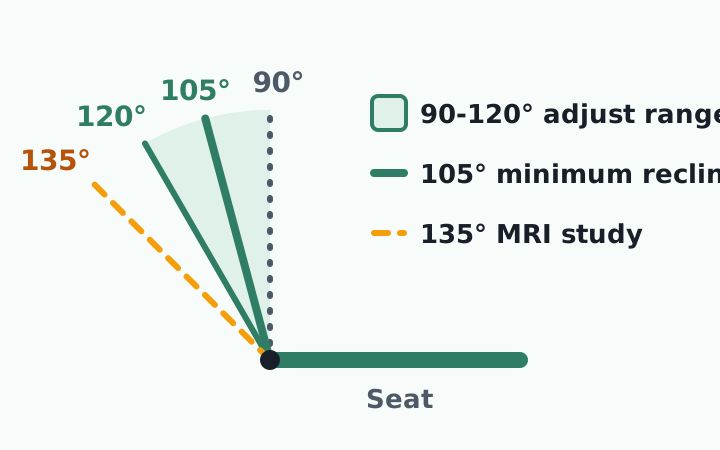
Official guidance is more modest. OSHA asks for a backrest that reclines at least 15 degrees and locks in place. BIFMA asks for 15 degrees of travel within 90 to 120 degrees.13 BIFMA adds that "there is no uniquely correct working posture that would fit any user for an extended period of time."3
Hans-Joachim Wilke and colleagues measured pressure inside the lumbar disc of one 45-year-old volunteer for about 24 hours. Noting the limits of a single subject, they cautiously concluded that constantly changing position matters for feeding the disc.10 When you try a chair, judge how easily it moves with you, not how far it tilts.
Armrests and base: fit them to your shoulders and desk
Armrests that do not fit are worse than none. Too high and your shoulders stay raised. Too low and you lean to one side. OSHA's advice is direct: if armrests cannot be properly adjusted, or they get in the way of your desk, remove them or stop using them.2
| Item | Guideline | Source |
|---|---|---|
| Armrest height above seat | 7.7-11.4 in (19.5-28.9 cm) | BIFMA G13 |
| Armrest height above seat | 7-10.5 in (18-27 cm) | OSHA1 |
| Armrest length | 10 in (25 cm) or less from the seat back | CCOHS5 |
| Base | Five legs, casters suited to the floor | OSHA2 |
BIFMA's range comes from seated elbow height, yet the guideline admits that many armrests adjust only from about 7.9 to 9.8 inches.3 So check the lowest setting, and whether the armrests slide under your desk.
Evidence that arm support protects the neck and shoulders is mixed. In a 2018 Cochrane review of 15 randomized trials, an arm support used with an alternative mouse roughly halved new neck or shoulder disorders (risk ratio 0.52). An arm support with a regular mouse showed no clear difference.15
Is there a best office chair for lower back pain?
If you are searching for the best office chair for lower back pain, start here. Researchers at Chulalongkorn University in Thailand pooled 14 studies of chair changes in office workers. The evidence was rated very low to low quality and the results conflicted. Their conclusion: chair interventions are not recommended as a way to reduce low back pain.12
| Review or study | What it covered | Conclusion |
|---|---|---|
| Channak et al. 202212 | 14 studies in office workers | Very low to low quality evidence, conflicting results |
| van Niekerk et al. 201213 | 5 studies, mostly garment workers | All found less pain right after the change. Evidence only moderate |
| Amick et al. 200314 | Office workers in 3 groups, 12 months | Only chair plus training slowed symptom growth over the workday |
In the third row, Benjamin Amick's team at the University of Texas School of Public Health gave one group a highly adjustable chair plus ergonomics training and another group training only. After 12 months, only the chair-with-training group had slower symptom growth across the workday.14 A chair works when you know how to set it.
The same test applies to a gaming chair: compare seat height range, seat depth and armrest range, not the styling. We cover that in why your head still drifts forward in a gaming chair.
How to adjust your office chair in 7 steps
Many good chairs feel bad because nobody adjusted them. This order follows CCOHS, with the desk added.5
- Stand in front of the chair and set the highest point of the seat just below your kneecap.
- Sit with your feet flat on the floor. If you feel pressure under your thighs, lower the seat a little.
- Sit back and check for a fist of space, about 2 inches, between the seat edge and your calves.
- Move the backrest or lumbar support until the curve fits the hollow of your lower back.
- Let your arms hang, bend your elbows to about 90 degrees, and set the armrests to barely touch them. If the lowest setting lifts your shoulders, take the armrests off.
- Pull up to the desk. Elbows should be about level with the surface. If you had to raise the chair, add a footrest.
- Set the recline tension so the backrest holds you but still moves when you lean.
If you had to raise the seat for a high desk, see when you need a footrest. For the desk and monitor, see how to set monitor, desk and chair height. If your chair has no seat slider or lumbar adjustment, read what to check before buying a lumbar or seat cushion.
- Measure the seat height where your feet rest flat today, and the space under your desk.
- Find the seat height range, seat depth and armrest range in the product specs.
- In a showroom, sit for at least 10 minutes, both working and reclined.
- Check the return policy before ordering.
If pain travels from your back or buttock down a leg, or numbness or weakness does not go away, don't put it down to the chair. See a doctor for a proper evaluation.
If a new chair is your fresh start, set its height and depth in the order above before you settle in. A chair you never adjust is just a chair.
After the chair is set: noticing when you drift
Choosing an office chair comes down to six adjustment ranges taken from measured bodies. Evidence that a chair alone reduces back pain is still weak, and the seated spine stays well flexed whatever the features.9
What remains comes after setup. Absorbed in work, your back leaves the backrest and your head moves toward the screen, and you rarely notice when it happens. So the useful habit at a desk is to notice when your head has drifted forward and bring it back.
RightPose AI is a desktop app for Windows and Mac that helps with the noticing. Once your chair is set, you register that sitting position as your own baseline. At an interval you choose (5 minutes by default), the app takes a brief look through your laptop or monitor webcam and shows an on-screen alert if you have moved into a forward head posture. It also reminds you to stand up and stretch, which is useful when a comfortable chair makes it easy to stay put. Camera images are processed on your device and are not sent off it.
If a new chair marks your fresh start, register your good posture right there after adjusting it.
RightPose AI is not a medical device. It is a habit tool that notices your posture and nudges you to reset and stretch.
FAQ
Is a mesh or cushioned office chair better?
It is mostly a question of heat and upkeep, not back support. CCOHS says the seat surface should be a breathable material that limits heat and moisture buildup.4 Cornell notes that vinyl is easy to clean but doesn't breathe, while cloth is common but harder to keep clean.6 We did not find studies showing that one material is better for back pain.
Do I need a headrest on an office chair?
OSHA's purchasing checklist says a headrest should be provided if the backrest reclines more than about 30 degrees from vertical.1 If you sit upright for most of the day, your head will rarely touch it. It earns its place if you lean back for calls or reading.
What should short or tall people look for?
The ends of the adjustment ranges. Shorter people need a low minimum seat height and a seat no deeper than about 16.3 inches. Taller people need the top of the range, up to about 20 inches.3 OSHA also notes that most chairs are designed for people under 275 pounds, so check the weight rating if that applies.1
Is sitting itself bad for your back?
The evidence is less clear than headlines suggest. A summary of eight systematic reviews found strong evidence against a causal link between occupational sitting and low back pain.16 In the one-person disc pressure study, relaxed sitting, and even upright sitting without a backrest, loaded the disc slightly less than standing.10 Long periods of sitting are still linked to other problems, including metabolic and heart conditions, so breaks matter.4
References
- Computer Workstations eTool: Checklists, Purchasing Guide
- Computer Workstations eTool: Workstation Components, Chairs
- BIFMA G1-2013 Ergonomics Guideline for Furniture Used in Office Work Spaces Designed for Computer Use (BIFMA standards overview)
- Office Ergonomics: Ergonomic Chair
- Office Ergonomics: How to Adjust Office Chairs
- How to choose an ergonomic chair
- Selecting a Chair
- The influence of backrest inclination and lumbar support on lumbar lordosis
- The impact of office chair features on lumbar lordosis, intervertebral joint and sacral tilt angles: a radiographic assessment
- New in vivo measurements of pressures in the intervertebral disc in daily life
- The Way You Sit Will Never Be the Same! Alterations of Lumbosacral Curvature and Intervertebral Disc Morphology in Normal Subjects in Variable Sitting Positions Using Whole-body Positional MRI
- The effects of chair intervention on lower back pain, discomfort and trunk muscle activation in office workers: a systematic review
- The effectiveness of a chair intervention in the workplace to reduce musculoskeletal symptoms. A systematic review
- Effect of office ergonomics intervention on reducing musculoskeletal symptoms
- Ergonomic interventions for preventing work-related musculoskeletal disorders of the upper limb and neck among office workers
- Systematic review: occupational physical activity and low back pain
This article is for general information only and is not a substitute for medical diagnosis or treatment. If pain persists or worsens, consult a medical professional.