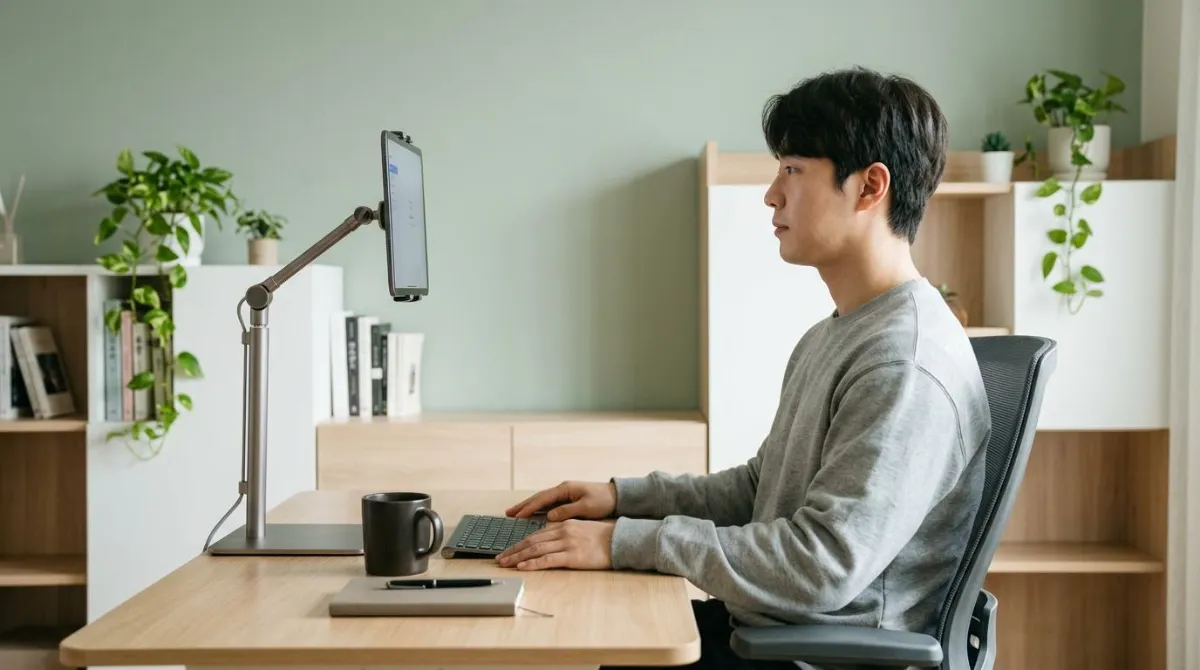
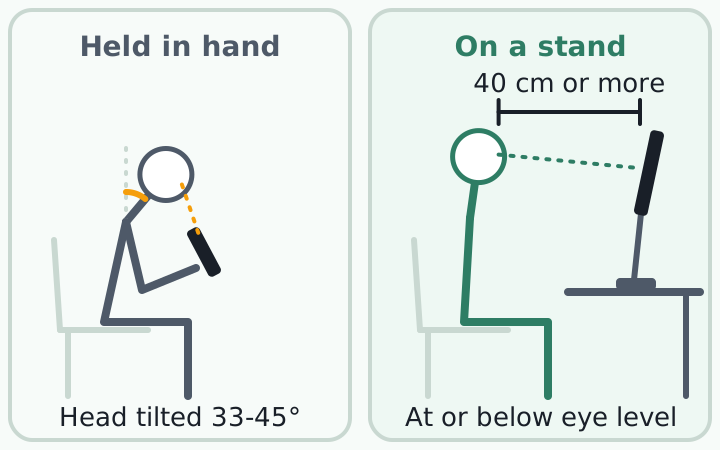
A tablet or phone stand does one job for your neck: it lifts the screen to eye level or slightly below, so you can look without folding your head forward. The Japan Human Factors and Ergonomics Society (JES) recommends a stand instead of your hand whenever you watch a screen for more than about 15 minutes.1 Lab studies show that propping a tablet up high brings head and neck posture closer to neutral.2
What a stand can't promise matters too: popular text neck numbers are shakier than they look, and research on pain is split.
How far does your head tilt when you look at a phone?
Researchers at the Ulsan National Institute of Science and Technology (UNIST) in South Korea measured 18 people texting, browsing, and watching videos. Their heads tipped 33 to 45 degrees forward from vertical (median values), most while texting and while sitting.3 Walking was no better: in 28 young adults, two-handed texting meant a 38.5-degree tilt, versus -1.2 degrees with no phone.4
Phones also sit close to the face. In a SUNY College of Optometry study, people held text messages an average of 36.2 cm (about 14 inches) from their eyes and web pages 32.2 cm, closer than the 40 cm adults typically use for print.5
| Situation | Measured | Who |
|---|---|---|
| Sitting or standing with a phone | Head tilted 33 to 45° | 18 adults, lab3 |
| Walking, two-handed texting | Head tilted 38.5° | 28 young adults4 |
| Reading texts / web pages | 36.2 cm / 32.2 cm away | 129 / 100 people5 |
A Harvard School of Public Health team measured 15 experienced tablet users in four setups and found more head and neck flexion than earlier studies had reported for desktops and laptops.2 Only a tablet propped steeply on a table, the movie-watching setup, came close to neutral.6
Compared to typical desktop computing scenarios, the use of media tablet computers is associated with high head and neck flexion postures, and there may be more of a concern for the development of neck and shoulder discomfort.
Jack T. Dennerlein, PhD, Department of Environmental Health, Harvard School of Public Health, IOS Press news release, 2012
Where the 60-pound text neck number comes from
You have probably seen the claim that a 60-degree tilt puts 60 pounds on your neck; Cleveland Clinic warns that reading a phone near your lap "may put upwards of 60 pounds of force on your neck."7 The page doesn't say where the number comes from, but the same values appear in a three-page 2014 paper by Kenneth Hansraj, chief of spine surgery at New York Spine Surgery & Rehabilitation Medicine.8
Those numbers weren't measured in people. Hansraj built one cervical spine model in finite element software, assumed the head and neck weighed about 6 kg (13.2 pounds), and calculated the force at each angle. At 90 degrees, he wrote, the model's prediction was not reliable.8
| Head tilt | Calculated load | In kilograms |
|---|---|---|
| 0° (upright, head weight) | 10 to 12 lb8 | about 5 kg |
| 15° | 27 lb | about 12 kg |
| 30° | 40 lb | about 18 kg |
| 45° | 49 lb | about 22 kg |
| 60° | 60 lb | about 27 kg |
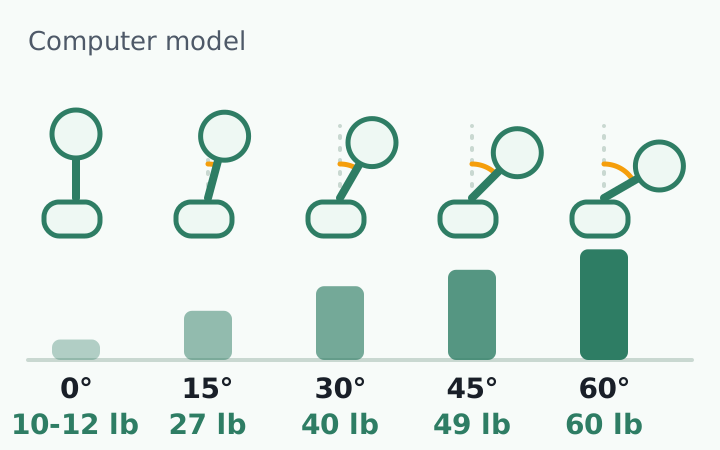
One model with one average head weight can't capture differences between people. Read it as a direction: the further you tip, the harder your neck works.
Anita Vasavada's lab at Washington State University made a more personal estimate, feeding each participant's X-ray-based neck posture into a musculoskeletal model. Seated tablet use put 3 to 5 times the neutral demand on the neck muscles, lowest with the tablet propped up high.9
Does text neck cause neck pain? The research is split
You might expect people who tilt more to hurt more. The evidence doesn't line up that neatly.
| Study | Who and how | What it found |
|---|---|---|
| Gustafsson et al. 2017, Sweden10 | 7,092 adults aged 20 to 24, surveyed over 5 years | Texting linked to neck and arm symptoms (odds ratios 1.3 to 2.0), mostly short-term |
| Xie et al. 2017, review11 | 15 studies | Neck complaints in 17.3% to 67.8% of users; some evidence for neck flexion, inconclusive on hours of use |
| Correia et al. 2021, Brazil12 | 582 adults, neck flexion measured while texting | No link between flexion angle and neck pain |
| Correia et al. 2025, Brazil13 | 396 pain-free adults followed for 1 year | Angle not a risk factor; poor sleep and low activity were |
| Resende et al. 2025, review14 | 21 studies | None met the criteria for causation |
The positive findings come with fine print. In the Swedish cohort, among people who started symptom-free, the only new symptoms tied to texting were in the hands and fingers (odds ratio 2.0). Neck and upper back pain was tied to texting mainly as persisting pain in people who already had it (odds ratio 1.6).10
In the Brazilian follow-up, 40 of 396 people (10%) developed neck pain within a year. Neck angle while texting made no difference; low sleep quality (odds ratio 1.76) and too little physical activity (odds ratio 2.41) did.13
The honest summary: there isn't good evidence that a bent-head posture causes neck pain, and not enough to rule it out. In the 2025 review, 90% of studies were observational, which makes cause and effect hard to untangle.14
If neck or shoulder pain lasts more than a few days, or comes with arm numbness, hand weakness, or dizziness, see a doctor rather than relying on a stand. This guide covers screen setup, not diagnosis or treatment.
For the symptoms that call for a visit, see when to see a doctor for neck pain.
Phone and tablet stand height: eye level, arm's length
Height guidance is consistent: eye level or slightly below. Timing advice clusters around a break every 15 to 30 minutes.
| Source | Height and distance | Time |
|---|---|---|
| Japan Human Factors and Ergonomics Society1 | Stand after about 15 minutes; eye level or slightly below; over 40 cm, about arm's length | Every 20 minutes, look 20 feet away for 20 seconds |
| Cleveland Clinic7 | Phone on an eye-level stand for meetings and long calls | Sessions of 15 to 30 minutes; no single pose over 20 minutes |
| Jack Dennerlein, Harvard School of Public Health15 | Tablet on a table, in a case at a comfortable viewing angle | A break every 15 minutes |
How to set the height at your desk
- Sit as you normally work and look straight ahead. Set the screen at that eye level or a little below.1
- If the stand doesn't go high enough, stack books or magazines under it.1
- Place it about an arm's length away, at least 40 cm (16 inches) from your eyes.1
- If you lean in to read, increase the font size; a screen that's too far away pulls you forward too.1
If you also use a laptop, raise its screen to a similar height so you're not bobbing between devices. See how to set up a laptop stand.
Build it into your daily routine: when you sit down to work, put your phone on its stand first. Videos and long calls happen there, not in your hand.
What angle should a tablet stand be? Watching vs. writing
Tilt is a trade-off. Steep angles help the neck, but as the Harvard team's press release noted, "steeper angles may be detrimental for continuous input with the hands."6
For writing or drawing with a stylus, Mahidol University physical therapy researchers in Thailand had 20 young adults write for 40 minutes on a tablet at 0° (flat) and at 30°. At 30°, neck flexion and neck discomfort were lower, though the right upper trapezius, the muscle across the top of the shoulder, worked harder.16
Time mattered too: neck discomfort rose noticeably after 20 minutes. The authors recommend a 30° tilt and keeping tablet writing to 20 minutes.16
Phone holder for bed: lie on your back, not your side
Shopping for a phone holder for bed? Settle the position first. A Yonsei University team in South Korea measured neck muscles in 23 young adults watching videos in four lying positions. Lying on the back produced the lowest muscle activity and the least left-right imbalance.17
In a Northeastern University (China) study, 20 people texted or watched video in bed for 30 minutes. Discomfort rose over time in every position, and side-lying produced the highest upper trapezius and wrist extensor activity. The authors concluded it should be avoided.18
A couch recline with a tablet in your lap is no better. In a University of Arkansas study of 19 people, neck flexion there reached 71.6% of the neck's range of motion, versus 6.39% at a standard monitor. The authors suggested the neck's extensor muscles and passive tissues could still be strained.19
If you track screen time, total daily use hasn't been clearly tied to neck symptoms.11 The guidance above is about how long you look in one stretch.17
How to choose a phone or tablet stand: 5 checks
- Height: does it bring the screen near seated eye level? If it only tilts, add a book or riser.
- Tilt: steep for video, about 30° for writing.
- Stability: tap the screen; it shouldn't wobble. Check the base and non-slip feet.
- Fit: your device, case included, should be within the listed size and weight.
- Mount: desk base, clamp arm, or floor stand, to match where you use it. For bed, it should hold the screen in view while you lie on your back.
After the stand: catching the moment your head drops
The evidence supports this much: your head tips 30 to 45 degrees over a phone, and a higher screen reduces that angle and the load on your neck muscles. The load numbers come from a model, and the tilt-pain link is unsettled. Check three things today:
- Is the screen on its stand at or just below eye level?
- Is it at least 40 cm (16 inches) away, about arm's length?
- After 15 to 30 minutes, lift your head and gently roll your neck.
The hard part is habit. Even with a stand, focus pulls the phone back into your hand and your head toward the screen, and the moment your posture slips is hard to notice. At your desk, the practical move is to build the habit of catching that moment and resetting.
RightPose AI is a desktop app for Windows and Mac, so it doesn't watch how you hold your phone. It covers your desk time: using your laptop or monitor webcam, it checks your posture at a set interval (every 5 minutes by default) and shows an on-screen alert when it sees a forward head posture. You register your own good posture first, and camera images are processed on your device and never leave it.
If you're building a better daily routine, put your phone on its stand and register your good posture in RightPose AI before work starts. While you focus, your screen will tell you when your head drifts forward.
RightPose AI is not a medical device. It is a habit tool that notices your posture and nudges you to reset and stretch.
FAQ
What if I don't have a phone stand?
Support the arm holding your phone with your other hand and lift the phone so your neck stays as straight as you can manage. That is the JES guide's advice, along with keeping the screen more than 40 cm away.1 Cleveland Clinic chiropractor Andrew Bang, DC, also suggests changing position often, "even if that just means moving your phone from hand to hand."7
Does a phone stand fix text neck?
A stand changes where the screen sits, so you can look without tipping your head as far, and lab studies show that.2 We could not find trials showing that people who use stands end up with less neck pain. In a one-year study, poor sleep and low physical activity predicted new neck pain while head angle did not, so a stand is one piece of the picture.13 If pain or numbness persists, see a doctor.
Does a stand help with eye strain too?
A stand mainly changes neck posture, but it also makes a healthy viewing distance easier; people tend to hold phones closer than the 40 cm used for print.5 For your eyes, the JES guide recommends the 20-20-20 rule: every 20 minutes, look at something 20 feet (about 6 m) away for 20 seconds. The guide credits the rule to California optometrist Jeffrey Anshel.1
References
- Seven practical Human Factors and Ergonomics (HF/E) tips for teleworking/home-learning with tablet/smartphone devices
- Touch-screen tablet user configurations and case-supported tilt affect head and neck flexion angles
- Head flexion angle while using a smartphone
- Head flexion angle when web-browsing and texting using a smartphone while walking
- Font size and viewing distance of handheld smart phones
- Shoulder Pain from Using your iPad? Don't Use It on Your Lap
- Are Your Screens a Pain in the 'Tech Neck'?
- Assessment of stresses in the cervical spine caused by posture and position of the head
- Gravitational demand on the neck musculature during tablet computer use
- Texting on mobile phones and musculoskeletal disorders in young adults: A five-year cohort study
- Prevalence and risk factors associated with musculoskeletal complaints among users of mobile handheld devices: A systematic review
- Association Between Text Neck and Neck Pain in Adults
- Cervical flexion posture during smartphone use was not a risk factor for neck pain, but low sleep quality and insufficient levels of physical activity were. A longitudinal investigation
- Neck pain and text neck using Hill's criteria of causation: A scoping review
- 4 tips for preventing neck strain when using a tablet computer
- The effect of tablet tilt angles and time on posture, muscle activity, and discomfort at the neck and shoulder in healthy young adults
- Differences in neck muscle activity according to lying positions using a smartphone
- Effects of lying posture and task type on muscle fatigue, visual fatigue, and discomfort while using a smartphone on the bed
- The influence of a semi-reclined seated posture on head and neck kinematics and muscle activity while reading a tablet computer
This article is for general information only and is not a substitute for medical diagnosis or treatment. If pain persists or worsens, consult a medical professional.