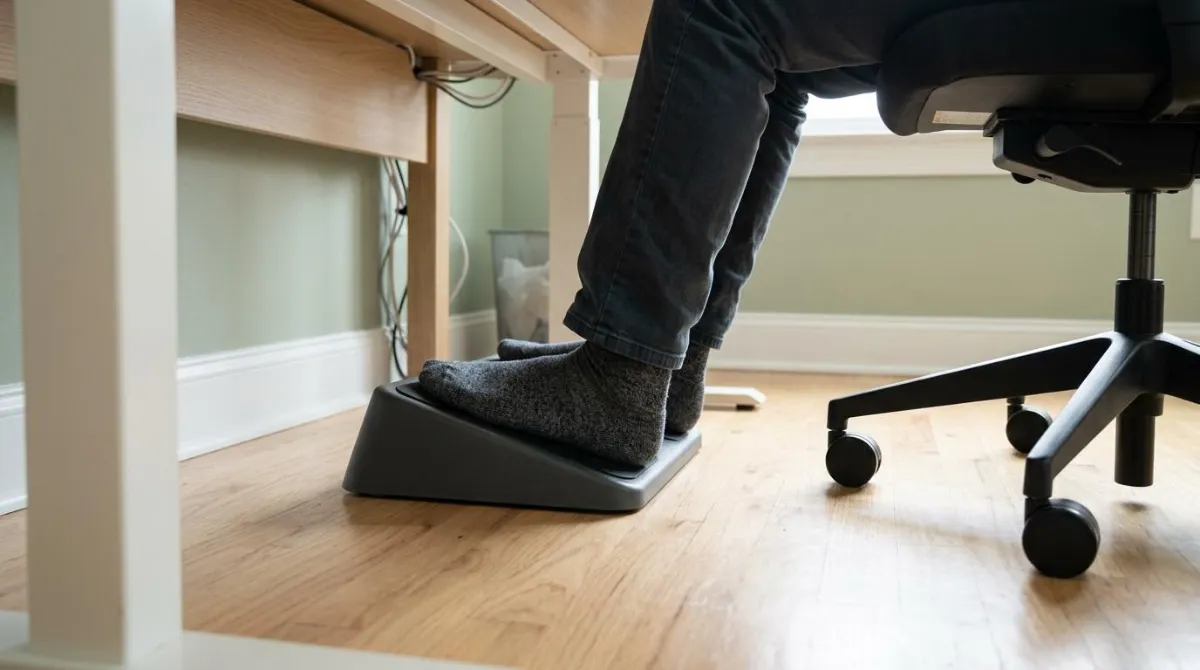
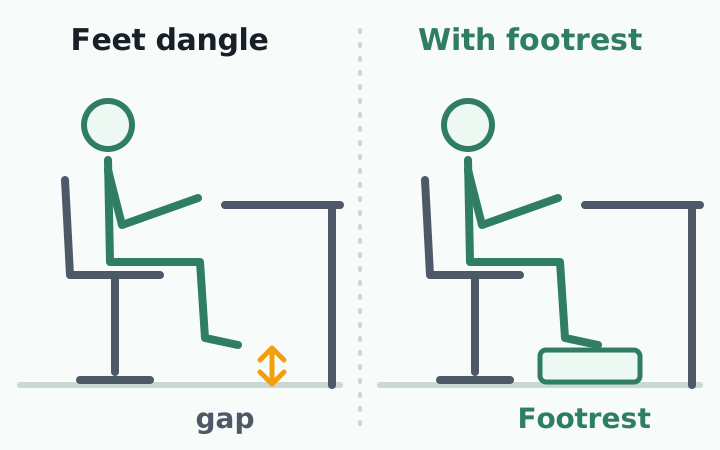
Do you need a footrest at your desk? Only if your feet don't rest flat on the floor after you set your chair to your desk and keyboard.12 The height you need is the gap between your soles and the floor, and if your desk can be lowered, lowering it comes first.4
This guide covers how to tell, how to size the footrest by your height and desk, and what angle to try. It also covers what footrest research does and does not show.
When you need a footrest under your desk
OSHA's computer workstation guidance says the chair is the right height when the whole sole of the foot rests on the floor and the back of the knee sits slightly higher than the seat. If the seat can't be lowered, for example because the keyboard would end up too high, it says to use a footrest for stable foot support.1
The Canadian Centre for Occupational Health and Safety (CCOHS) gives the same order. Set the chair so your elbows are about level with the work surface. If your feet then can't lie flat on the floor, use a footrest that is adjustable and supports both feet.2 The cause is the desk: raising the chair to reach a high desk is what lifts your feet.
Other countries' workplace rules read the same way. Japan's health ministry guideline makes a flat sole on the floor, in the shoes you actually wear, the baseline, and calls for a footrest that is wide enough and non-slip 'as needed.'13 Korea's labor ministry notice also starts from the whole sole on the floor and adds a footrest 'at a height and angle that fit the conditions' only when that isn't possible.14 None of the four agencies I checked (OSHA, CCOHS, Japan, Korea) gives a footrest height in centimeters, because the right number depends on your gap.
| After setting the chair | Verdict | Next step |
|---|---|---|
| Whole sole rests on the floor | No footrest | Leave it. An unneeded one can leave the thighs under-supported5 |
| Heels float or only toes touch | Footrest | Measure the gap and size it |
| Chair could go lower but is raised | Chair first | Lower it, then recheck your elbows |
| Seat edge presses behind the knee | Seat depth first | Adjust seat depth or where you sit; if it still presses, a footrest can raise the knees slightly16 |
Footrest under desk ergonomics: lower the desk first
The University of North Carolina at Chapel Hill's safety office calls a footrest 'a last resort.' Its preferred fix is a shorter chair cylinder and a lower desk, so the surface sits about one inch (2.5 cm) above seated elbow height.4 The reason: with a footrest the feet have one place to rest, which narrows the postures you can shift through in a day.4
Use footrests as a last resort.
University of North Carolina at Chapel Hill, Environment, Health and Safety, Office Ergonomics
That matters for sit-stand and other adjustable desks too. If yours goes low enough, lower it before you buy anything. How to set one is in our standing desk guide.
How high should a footrest be? A sizing table
Cornell's Alan Hedge, an ergonomics professor, describes a flat surface 28 to 30 inches (71 to 76 cm) high, used for both paper and computer work, as suitable for most adults.10 The table below shows what that means for a shorter person. I took the desk height that puts a person of each height at elbow level from our height-by-height setup guide and subtracted it from a 72 cm (28.3 in) or 70 cm (27.6 in) desk. These are calculated figures, not measurements of people.
| Height | 72 cm desk | 70 cm desk |
|---|---|---|
| 150 cm (4'11") | about 13 cm (5.1 in) | about 11 cm (4.3 in) |
| 155 cm (5'1") | about 12 cm (4.7 in) | about 10 cm (3.9 in) |
| 160 cm (5'3") | about 9 cm (3.5 in) | about 7 cm (2.8 in) |
| 165 cm (5'5") | about 8 cm (3.1 in) | about 6 cm (2.4 in) |
| 170 cm (5'7") | about 6 cm (2.4 in) | about 4 cm (1.6 in) |
| 175 cm (5'9") | about 4 cm (1.6 in) | about 2 cm (0.8 in) |
| 180 cm (5'11") | about 3 cm (1.2 in) | about 1 cm (0.4 in) |
| 185 cm (6'1") | about 1 cm (0.4 in) | none |
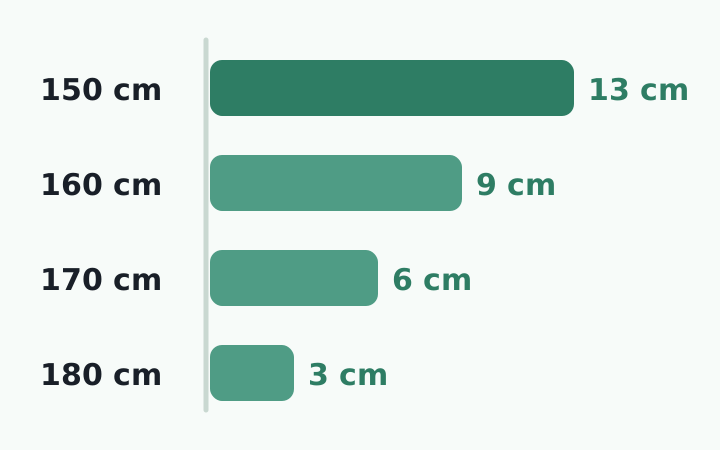
Treat the table as a starting point. Keyboard thickness, shoe soles and desktop thickness can shift the result by 2 to 3 cm, so for small values your own measurement beats the table.
Setting footrest height and angle, step by step
- Sit all the way back in your usual shoes or slippers.
- Set the chair so your shoulders stay down and your elbows rest near the keyboard.2
- Measure the gap between your soles and the floor. That is your height.
- Place the footrest and check that your thighs are level. UNC accepts a thigh position within one to three inches (about 2.5 to 7.5 cm) of level.4
- Check the space between the seat edge and the back of your knee. Weill Cornell's safety office suggests the seat edge sit 2 to 3 inches (5 to 8 cm) from the back of the knees.11
Mayo Clinic says to aim for thighs parallel to the floor, and suggests a small stool or a stack of sturdy books if you don't own a footrest.3 That makes a good test. Live with a stack for a few days, then buy something that makes that height.
Add one line to your daily routine: when you sit down, set the chair first and glance at the gap under your feet. After lunch, move your feet to a slightly different spot.
What angle should a footrest be?
No agency I checked sets an angle. OSHA and CCOHS give no number,12 and Korea's workplace notice only says 'a height and angle that fit the conditions.'14 What exists are university guides and one small experiment, and they disagree.
| Source | Angle | Nature |
|---|---|---|
| Polytechnic University of Catalonia (UPC) | 5 to 15° from horizontal | Guidance, no study cited7 |
| Temple University safety office | 10 to 30° adjustable | Buying guide, no study cited6 |
| Japanese experiment, 6 people (2014) | 0°, 15°, 30° | Leg swelling fell at 30°9 |
In the Japanese experiment, six volunteers lay down for 20 minutes, sat on a high stool for 30 minutes to swell their legs, then sat 30 minutes with a footrest at one of three angles. Bioelectrical impedance showed less swelling at 30°.9 With six people, a short session, and a swelling measure rather than comfort or pain, it can't tell you that 30° is the right angle.
That is about as far as the evidence goes. Start flat or around 10 to 15°, then adjust toward whatever feels easy on your ankles. The shared advice is to avoid freezing in one position. UNC notes that a rocking footrest helps you avoid a static posture.4
Four things to check before buying
| Check | Look for | Basis |
|---|---|---|
| Height range | Covers your measured gap (2 to 6 in, about 5 to 15 cm, is recommended) | 6 |
| Size and grip | Both feet fit, stays put, non-slip base | 713 |
| Tilt | Adjustable or lockable | 67 |
| Legroom | You can still stretch your legs under the desk | 3 |
Alan Hedge's advice on any 'ergonomic' product applies here. Ask what research the maker can show, and be wary of products that haven't been studied.10
What a footrest does, and what it doesn't
A 2022 laboratory study in Applied Ergonomics had 20 people do computer tasks of varying difficulty with and without an angled footrest. With the footrest they used the chair's backrest more, their pelvis rotated toward the backrest, and their spinal flexion changed. The measured muscle activity did not change.8 The study did not track pain.
In what I read, I found no study showing that a footrest by itself reduces pain for people who sit. This guide makes no such claim. The University of Aberdeen warns about the opposite error: using a footrest when it isn't needed leaves the thighs less supported and puts extra pressure on the buttocks and the base of the spine.5 Cleveland Clinic's Dr. Andrew Bang, a chiropractor, lists 'both feet flat on the floor (or on a footrest if needed)' among the basics.12
- It gives a floor to people whose raised chair leaves their feet hanging.
- It doesn't replace chair, desk or monitor height. Follow the order in our setup guide and check the chair with these criteria.
- It doesn't solve long sitting. You still need to get up, as in our break timing guide.
If you have swelling, numbness or pain in one leg, or neck or back pain, tingling or weakness that persists, see a clinician before changing equipment. This guide is not a diagnosis.
After your feet are sorted, your head is next
To recap: a footrest is for feet that hang after the chair is set, its height is the measured gap, and angle has no single right answer.
What's left is staying aware once you're absorbed in work. You can sit at a well-set desk and still drift your head forward without noticing. What you can do at your desk is notice the moment your head comes forward and bring it back until that becomes a habit.
RightPose AI is a desktop app for Windows and Mac. Using your laptop or monitor camera, it briefly checks your posture at an interval you set (every 5 minutes by default) and, judged against the good posture and forward-head posture you register at the start, tells you on screen when your head has moved forward. Camera images are processed on your device only. Once your footing is set, it's the part that notices your head.
If you're building a better daily routine, register your good posture first and start from there.
RightPose AI is not a medical device. It is a habit tool that notices your posture and nudges you to reset and stretch.
FAQ
I have a sit-stand desk. Do I still need a footrest?
Usually not. Lowering the desk to elbow height removes the reason to raise the chair, so your feet reach the floor. UNC's safety office recommends lowering the desk first.4 Use a footrest only if your height still leaves your feet hanging at the lowest setting.
Can I use books or a box instead of a footrest?
As a test, yes. Mayo Clinic suggests a small stool or a stack of sturdy books.3 Make sure both feet fit and the stack can't slide or collapse. It also helps you find your height before buying.
What should my knee angle be with a footrest?
Sources word it differently. OSHA says the back of the knee slightly higher than the seat,1 Mayo Clinic says thighs parallel to the floor,3 and UNC says within one to three inches of level.4 Korea's labor ministry notice says around 90 degrees14 and Weill Cornell's safety office says knees bent at about 90 degrees,11 but I found no source that requires exactly 90.
Should I keep my feet on the footrest all day?
No. Shift position now and then or move your ankles. UNC explains that with a footrest the feet have only one place to rest, and that a rocking footrest helps you avoid a static posture.4
References
- Computer Workstations eTool: Workstation Components - Chairs
- Office Ergonomics - How to Adjust Office Chairs
- Office ergonomics: Your how-to guide
- Office Ergonomics
- DSE Assessment Guidance
- Ergonomic Footrest Buying Guide
- Ergonomic recommendations: Office furniture (ER 004/03)
- The effects of using a footrest during computer tasks varying in complexity and temporal demands: A postural and electromyographic analysis
- Effect of Footrest Angle on Decrement of Leg Swelling while Sitting
- Ergonomic Guidelines for arranging a Computer Workstation - 10 steps for users
- Computer Workstation Setup and Use Tips
- Ergonomics 101: How To Set Up Your Desk To Avoid Aches and Pains
- 情報機器作業における労働衛生管理のためのガイドライン (Guideline for occupational health management of information device work)
- 영상표시단말기(VDT) 취급근로자 작업관리지침 (Work management guideline for VDT workers)
This article is for general information only and is not a substitute for medical diagnosis or treatment. If pain persists or worsens, consult a medical professional.