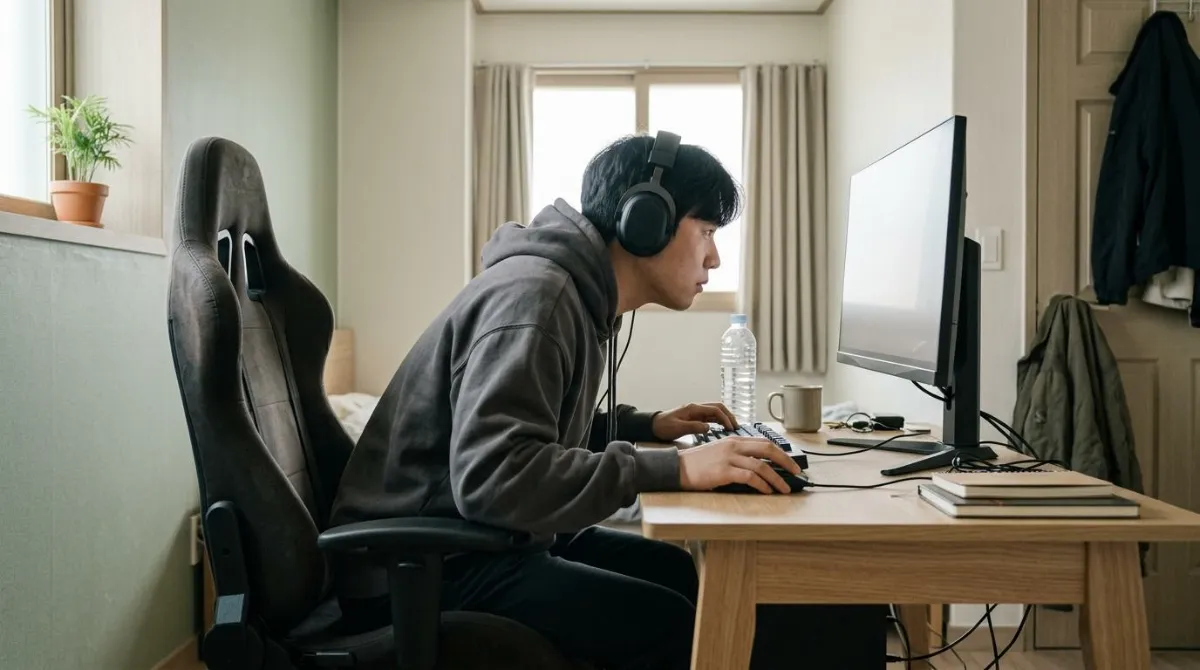
Gaming chair posture changes once a match absorbs you, and a bucket seat does not stop that. In a 2026 study that put people in the same chair, gaming tilted the pelvis back 13.1 degrees more, bent the upper back 6.1 degrees more and extended the neck 10.6 degrees more than office work.1 The chair stayed the same. What you were doing with it changed.
This guide checks what studies measured during gameplay, how common pain is among esports players, what the one chair trial found, and what official guidance says about monitor height and breaks. Chair dimensions and adjustment ranges are in how to choose an office chair, so this one stays on gaming chairs and long sessions.
Gaming chair vs office chair: what a bucket seat is built for
Many gaming chairs borrow from racing seats: a tall back, side wings, detachable neck and lumbar cushions and a deep recline. A 2025 trial of esports players describes that design as built for a reclined, relaxed posture, and contrasts it with an office chair built for upright work.2
| Feature | Common on office chairs | Common on gaming chairs |
|---|---|---|
| Backrest | Mid or upper back, follows the spine | Reaches the shoulders, side wings |
| Neck and lumbar support | Built into the back, or absent | Strap-on cushions you position |
| Recline | Centered on working angles | Extends to near-flat resting angles |
| Adjustment range | Varies a lot by model | Varies a lot by model |
The table shows tendencies, and individual models differ. The point to hold onto is that the design assumes you lean back. Whether you actually sit that way while playing is a separate question.
What changes when you game: a 2026 comparison with office work
Researchers at the University of Waterloo in Canada, including Jessa Davidson and Jack Callaghan (Canada Research Chair in Spine Biomechanics), used accelerometers to record spine posture in the same chair during three gaming tasks or three standardized office tasks.1 During gameplay they also tracked the head, upper body, desk and monitor with optical motion capture. Each participant did one set of tasks or the other, so this compares tasks, not chairs.
| Measure | Gaming vs office work | Statistical result |
|---|---|---|
| Pelvis tilted back | 13.1 degrees more | Clear |
| Upper back bend | 6.1 degrees more | Clear |
| Neck extension | 10.6 degrees more | Clear |
| Lower back bend | 6.3% of max flexion more | Not clear |
Gamers also placed the top of the monitor about 55 cm (22 in) from the eyes and 5 cm (2 in) above eye level.1 The paper discloses that an industry partner commissioned the work, paid part of it and reviewed the manuscript before submission. The researchers designed the study, and the decision to publish any result was agreed before data collection. The full text is paywalled, so I relied on the abstract and funding statement, which do not give the number of participants.
Education on ergonomic monitor placement may help moderate thoracic flexion and neck extension in gaming.
Jessa M. Davidson, Jack P. Callaghan and colleagues, University of Waterloo, Ergonomics 2026 (practitioner summary)
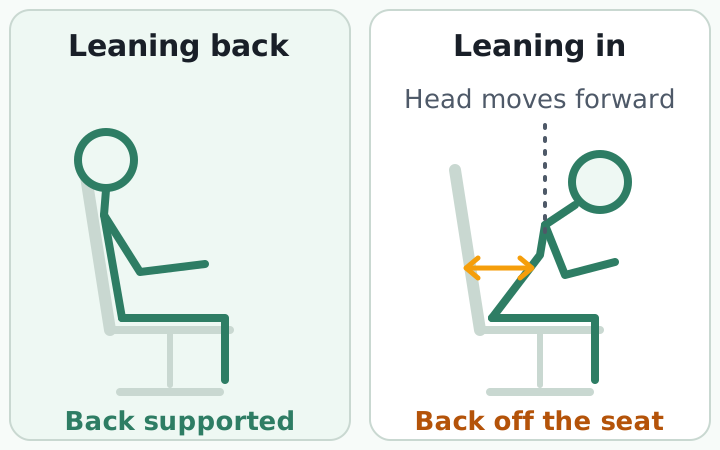
You may have seen numbers for how much bending your head down adds to neck load. A New York spine surgeon, Kenneth Hansraj, used a computer model to estimate that a neutral head of 10 to 12 pounds (about 4.5 to 5.4 kg) becomes 27 pounds at 15 degrees of tilt and 60 pounds at 60 degrees.10 That is a model, not a measurement in people, and the author notes that muscles and ligaments reduce the stress. In the Waterloo study the neck moved the other way during gaming, into extension, so these numbers do not map neatly onto gaming posture.
How often do gamers hurt? Four studies and their limits
| Study | Who | Finding |
|---|---|---|
| Denmark 20203 | 188 esports athletes, ages 15 to 35 | 42.6% had pain in the past week; back 31.3%, neck 11.3% |
| US and Canada 20194 | 65 collegiate esports players | Neck and back pain 42%; 40% did no exercise; 2% sought care |
| Thailand 20266 | Coached athletes ages 15 to 35 playing over 4 hours a day | Pain 63.1%; neck 40.7%; lower back 36.2% |
| Meta-analysis 20265 | 6 studies, 553 players | Past 7 days 44%; neck 48% (CI 26% to 70%) |
The numbers differ because the surveys asked about different periods, different player levels and different countries. The meta-analysis authors say the results need caution because methods varied and few studies qualified.5 These are questionnaires from a single point in time, so they cannot show that gaming caused the pain.
In the Danish study, athletes with pain trained 5.6 fewer hours per week, and the authors raised the possibility that pain reduced play rather than the reverse.3 In the Thai study, athletes playing more than 5 hours a day were more likely to report pain (odds ratio 1.74).6
Gaming chair vs office chair: the one trial, and five checks to make sitting down
Researchers at the New York Institute of Technology, led by Joanne DiFrancisco-Donoghue, had 33 League of Legends players game for two hours in one office chair and, on another day, two hours in one gaming chair, in random order.2 Muscle stiffness was lower in the gaming chair only in the left upper trapezius (p = .03). Four muscles on the right showed no difference, and 58% of players preferred the gaming chair.
The paper discloses funding from a gaming chair maker, and the authors note that one chair looked obviously like a gaming chair, which may have biased opinions. The trial also did not measure posture.2 I would not conclude that gaming chairs are better or worse. It is the only trial of its kind I found, so a ranking of models has little behind it.
The Waterloo team suggested that useful designs reduce backward pelvic tilt, support the upper back and neck in a forward-leaning posture, and encourage you to use the seat back.1 Turned into a check you can do in a showroom or at home:
- Plant both feet flat and make sure the seat edge does not press behind your knees (the numbers are in the office chair guide).
- Lean toward the screen as you would in a match and see whether the upper backrest still touches your upper back.
- Recline and check that your feet stay on the floor and the front of the seat does not lift.
- Rest your forearms on the desk and check that side wings or armrests do not get in the way.
- Sit with a strap-on lumbar cushion and check that it stays at the curve of your lower back instead of sliding.
Gaming desk and monitor: height and distance
OSHA, the US workplace safety agency, publishes monitor guidance for computer workstations, written for office work. It does not cover gaming, and I did not find gaming-specific numbers.7 Next to what Waterloo measured, it looks like this.
| Source | Top of screen | Eye to screen |
|---|---|---|
| OSHA7 | At or slightly below eye level | 20 to 40 in (50 to 100 cm) |
| Gamers measured 20261 | About 2 in (5 cm) above the eyes | About 22 in (55 cm) |
OSHA notes that a monitor set too high makes you work with your head and neck tilted back, and a screen that sits too far away makes you lean forward until the backrest stops supporting you.7 The Waterloo gamers' high monitors and larger neck extension point the same way, though that study did not test cause and effect. When you shop for a gaming desk, check that the depth lets you sit back at a workable distance. Matching desk, monitor and chair heights is covered in how to set monitor, desk and chair height.
Long sessions: how often to stand up
The UK Health and Safety Executive has no legal rule on break length for screen work. Its guidance is to take short breaks often, and it gives 5 to 10 minutes every hour as better than 20 minutes every two hours.8 That guidance is for workers, not gamers, but it gives a concrete rule of thumb.
In a six-month trial of 193 office workers in Bangkok, 17% of those given a device to prompt active breaks developed new neck pain, compared with 44% of the control group.9 It was not a gaming study and used research equipment, but it is one of few trials that tested breaks directly. How to time desk breaks goes through intervals.
Add one line to your daily routine: when a queue screen appears, put your back on the backrest and check that the top of your monitor is not above your eyes.
If neck or back pain persists, or you feel numbness or weakness in an arm or leg, see a doctor before changing your chair. The checks in this guide are not a diagnosis.
What a chair cannot do: noticing the moment you lean in
Three things hold up. Gaming posture differed from office work in the same chair, pain surveys of players ranged widely, and the case for gaming chairs over office chairs rests on one funded trial.
What remains is absorption. When you are deep in a match, you rarely notice your head creeping forward. Setting up the chair and monitor well does not tell you when you have drifted from that setup, so what you can do at your desk is build a habit of noticing when your head comes forward and bringing it back.
RightPose AI is a desktop app for Windows and Mac built for that noticing. You register your own good posture and your forward-head posture once, and it uses the webcam on your laptop or monitor to check your posture at an interval you choose (every 5 minutes by default), then tells you on screen when your head has moved forward. It also sends reminders to stand up and stretch, which fits the gap between matches. Camera images are processed on your device and never leave it.
If you're building a better daily routine, register your good posture before you queue up for the next ranked game.
RightPose AI is not a medical device. It is a habit tool that notices your posture and nudges you to reset and stretch.
FAQ
Is it okay to sit in a LAN center or gaming cafe chair for hours?
A shared chair may not adjust well to your body, so the practical habit is to break up the time whatever the chair. In the Thai esports survey, players above 5 hours a day were more likely to report pain.6 The UK HSE suggests 5 to 10 minutes every hour for screen work.8
Does a gaming mouse change your posture?
I did not find studies showing that a mouse type changes neck or back posture. The 2026 Waterloo study linked posture changes to the task and to monitor placement, and its authors suggested placement education.1 Choose a mouse for what it does to your wrist, not your neck.
How many hours a day is safe to game?
No safe number has been established that I could find. The Thai survey found that more than 5 hours a day and more than 5 years of experience were linked to pain, though a survey cannot show cause.6 Breaking up play every hour is closer to what guidance suggests than any daily total.8
Does a forward head cause neck pain?
In adults, a meta-analysis found people with neck pain had a more forward head than those without, but the authors call the relationship controversial. All 15 studies compared groups at one point in time, so it is unclear which came first.11 If pain lingers, read when to see a doctor for neck pain.
References
- Spine postures and workstation interactions in gaming: comparisons with office work and ergonomic guidelines
- Sitting for Success: A Randomized Controlled Study on the Impact of Chair Design on Muscle Stiffness and Performance in Video Gamers
- Musculoskeletal pain is common in competitive gaming: a cross-sectional study among Danish esports athletes
- Managing the health of the eSport athlete: an integrated health management model
- Do Esports Players Experience Pain? Pain Prevalence of Esports Players: a Systematic Review and Meta-analysis
- Prevalence of and factors associated with musculoskeletal disorders among Thai esports athletes
- Computer Workstations eTool: Workstation Components, Monitors
- Display screen equipment (DSE) workstation checks: Work routine and breaks
- Effects of an active break and postural shift intervention on preventing neck and low-back pain among high-risk office workers: a 3-arm cluster-randomized controlled trial
- Assessment of stresses in the cervical spine caused by posture and position of the head
- The Relationship Between Forward Head Posture and Neck Pain: a Systematic Review and Meta-Analysis
This article is for general information only and is not a substitute for medical diagnosis or treatment. If pain persists or worsens, consult a medical professional.