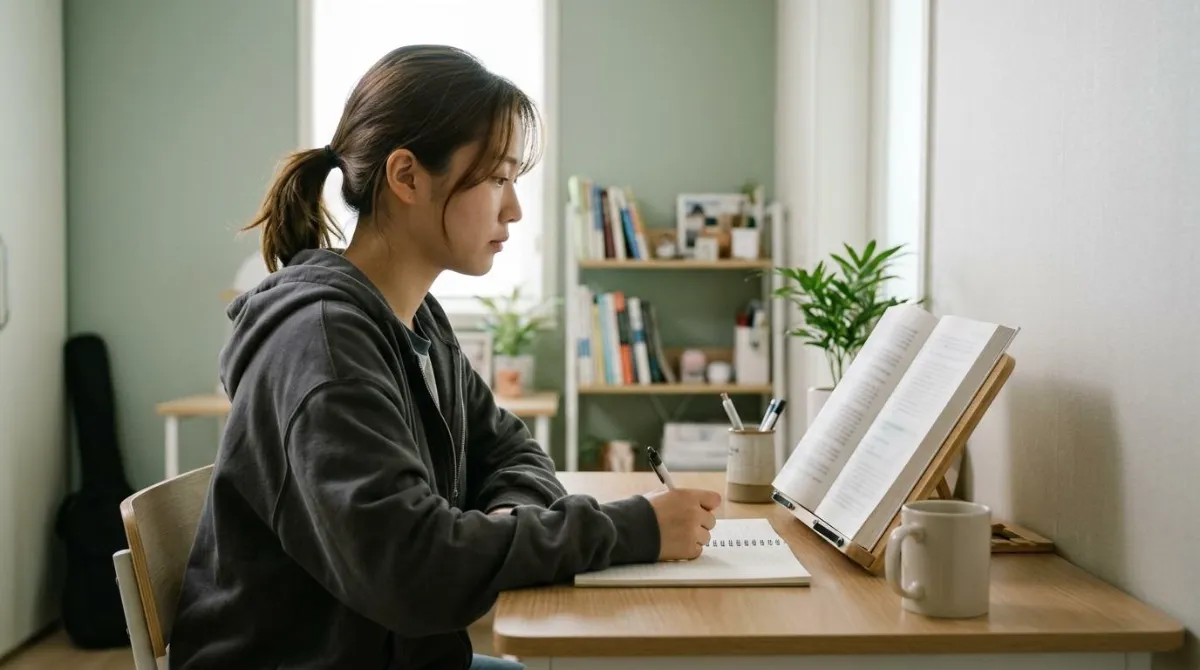
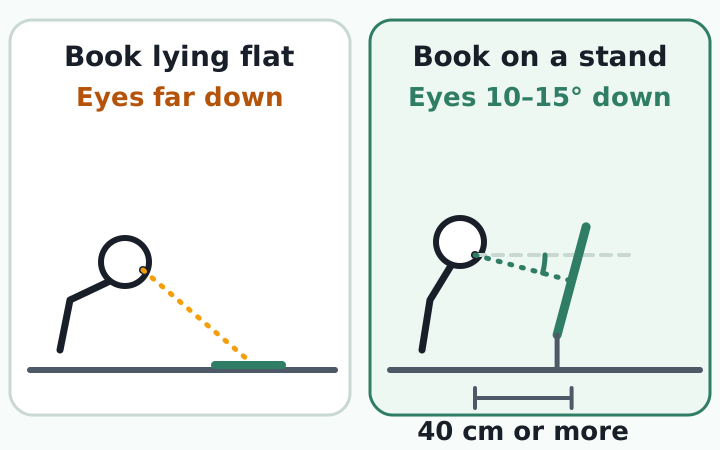
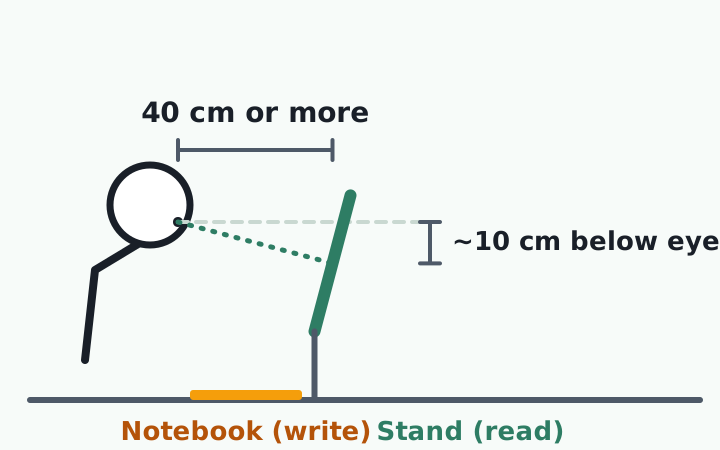
For book stand reading posture, set the height first and the angle second. South Korea's labor ministry guideline for screen work puts the gaze 10 to 15 degrees below level and at least 40 cm (about 16 in) from the eyes.14 Translated to a printed page, that puts the middle of the page roughly 10 cm (4 in) below eye level.
This guide checks where that rule comes from, how much sloped-desk experiments actually reduced neck flexion, and how to arrange a book and a notebook when you keep switching between reading and writing.
Book stand height comes before angle
In an experiment with 24 children aged 10 to 12, head and neck flexion rose as the visual target was lowered. A book lying flat on the desk bent both the upper and lower neck and drove more activity in the neck extensor and upper trapezius muscles than a mid-height display did.8
So tilting a stand does little if the page is still low. The workplace rules start from the eyes. The Korean guideline asks for the top of the screen at eye level, the gaze 10 to 15 degrees down, and 40 cm or more of distance.14 CCOHS, Canada's occupational health center, lists a viewing distance of 30 to 60 cm and suggests a document holder to bring paper to the same level as the monitor.3 OSHA says documents should sit at the same height and distance as the monitor.1
Those numbers are for screens, not paper. Applying the same idea to a book, you can ask how far below the eyes the page center sits at 40 cm.
| Gaze below level | Page center below eyes at 40 cm | Note |
|---|---|---|
| 10° | about 7 cm (3 in) | Low end of the guideline14 |
| 15° | about 10 cm (4 in) | High end of the guideline14 |
| 30° | about 20 cm (8 in) | Outside the guideline |
| 45° | about 28 cm (11 in) | Outside the guideline |
The table is simple geometry (40 cm times the sine of the angle), not a study result, and it changes with your reading distance. Your eyes also rotate, so gaze angle is not the same as neck flexion. The direction still matches the children's experiment: the lower the page, the more the head drops. Measure from the desk surface to your eyes while seated, because a low tabletop stand may not reach that high.
Sloped desk neck flexion: what the studies measured
Studies that compare book stands directly are rare. Several experiments tilted the desk or the work surface instead. They agree on direction, but the size of the change varies.
| Study | Who and what | Slope | Head and neck result |
|---|---|---|---|
| Freudenthal et al., 19914 | Mixed reading and writing | 10° desk | Head 38.5° to 29.6°, trunk 26.0° to 18.2° (averages) |
| Bendix & Hagberg, 19845 | 10 people reading | 0°, 22°, 45° | Steeper slope, more upright head and trunk |
| Hassaïne et al., 20156 | 12 people, 5 min reading | 20° | Less head flexion, more shoulder muscle activity |
| Asundi et al., 20127 | 15 people, laptop, 10 min | 12°, 25° | Neck flexion down about 2° per step |
In a 1989 experiment, 12 people took notes for 20 minutes from a source document held on a holder tilted at 29 degrees. The neck stood more vertical, and the moment of force at the base of the neck (C7-T1) fell from 88.2 to 79.1 (times body mass, in N·mm), about 10 percent. The angle between head and neck did not change.9
The price of a steeper slope
In the 20-degree experiment the neck became more erect while the front deltoid in the shoulder worked harder, and the authors tentatively warned this might be harmful in the long run.6 In the laptop study at 25 degrees, wrist extension grew and comfort scored lowest. The authors suggested 12 degrees for temporary setups.7
A larger angle helped the neck in several studies, but the shoulders or wrists paid for it. Not always, though: in the Bendix and Hagberg study, which went up to 45 degrees, upper trapezius load stayed low and did not change with the slope.5 We did not find a study that names one correct angle. Most of the experiments whose abstracts we read were short, with about 10 to 20 people working from a few minutes to 40 minutes.
Switching between reading and writing
In the Bendix and Hagberg experiment, participants rated a steep slope better for reading and a flat surface better for writing. The authors suggested putting the reading matter on the slope and the paper you write on at the level tabletop between the slope and you.5
For handwriting on a tablet, 20 young adults wrote for 40 minutes at 0 and 30 degrees. At 30 degrees neck flexion and neck discomfort were lower, but right upper trapezius activity was higher.10 It is the same trade-off: the neck gains, the shoulder pays.
OSHA advises placing documents at the same height and distance as the monitor, and says a holder between the keyboard and the monitor may suit tasks that involve frequent writing.12 No study tested the arrangement below directly. It is a combination of the sources above.
- Set chair and desk height first. The basics are in our exam-season desk posture guide.
- Put the notebook flat, centered in front of you.
- Stand the book right behind the notebook so the page center is about 10 cm below your eyes and at least 40 cm away.
- If you watch lectures on a laptop or tablet, bring it to a similar height next to the stand. See laptop stand setup and phone and tablet stands.
- If you write for long stretches, lower the stand a notch or slide it aside.
- Seated, the page center is about 10 cm below your eyes
- The page is at least 40 cm from your eyes, and the stand does not sag under a heavy book
- The notebook is flat in front of the stand, and the stand has not pushed the keyboard away
Add one line to your daily routine: before you start studying, check that the page center sits about 10 cm below your eyes, and stand up before the hour is over.
Choosing an adjustable book stand: five things to check
Names like "height-adjustable" or "two-tier" mean different things from maker to maker, so the name alone does not tell you how high the page will go. Check numbers in the listing.
| Check | Why | How |
|---|---|---|
| Maximum height | The page center should reach about 10 cm below your eyes | Measure desk surface to eyes while seated and compare |
| Angle range and hold | Steep for reading and flatter for writing worked better in one study5 | Check it does not sag under a heavy book |
| Surface size | An open A4 book (210 × 297 mm) is about 42 cm wide | Measure your book open |
| Page hold | A hand pinning the page makes writing hard | Look for a lip or clips |
| Desk space | A sloped surface can crowd out the flat area in front | Subtract notebook and keyboard space from desk depth |
OSHA's purchasing checklist asks for a holder that is stable but easy to adjust for height, position, distance, and viewing angle.2 This guide does not recommend products, only the criteria.
Where the "60 pounds on your neck" figure comes from
A popular chart says the neck bears 27 pounds (about 12 kg) at 15 degrees of forward tilt, 40 at 30 degrees, 49 at 45 degrees, and 60 pounds (about 27 kg) at 60 degrees. It comes from a 2014 paper by Dr. Kenneth Hansraj, chief of spine surgery at New York Spine Surgery and Rehabilitation Medicine.11
We are aware that the muscles, tendons, and ligaments dampen the stresses seen by the cervical spine.
Kenneth K. Hansraj, MD, New York Spine Surgery & Rehabilitation Medicine, Surgical Technology International, 2014
The numbers were calculated from a finite element computer model of the neck, not measured in people, and the author wrote that the model was not reliable at 90 degrees.11 Read the chart as a calculation showing that load grows as the head tilts, not as the weight your own neck carries. Reclining with a tablet in your lap is a different problem: in a study of 19 people, neck flexion reached 71.6 percent of range of motion, compared with 6.39 percent when reading a standard monitor.12
Children and school desks
A video-based study of school pupils reported that a school desk with a tilted top reduced neck and trunk flexion.13 It was a simple observational study, so it cannot say which angle suits a child. Fit the desk and chair height to the child first, then add a stand.
If neck pain, arm tingling, weakness, or dizziness continues after you change your setup, do not assume it is posture. See a doctor. Nothing here is a diagnosis. Our guide on when to see a doctor for neck pain lists warning signs.
After the stand is set, the habit still matters
A stand changes where the book is. With the page about 10 cm below your eyes and 40 cm away, and the notebook flat in front, studies found the head drops less. In the studies above the reduction ranged from about 2 to about 9 degrees, and sometimes the shoulders or wrists paid for it.
The hard part comes after setup. When you sink into a chapter or a lecture, your head drifts forward, and it is hard to notice that moment on your own. What you can do at your desk is build the habit of noticing when your head has moved forward and bringing it back.
RightPose AI is a desktop app for Windows and Mac for your screen time, such as lectures on a laptop or looking things up, not for reading a paper book. Using the webcam on your laptop or monitor, it briefly checks your posture at an interval you choose (every 5 minutes by default) and shows an alert on screen when your head is forward. It also reminds you to stand up and stretch at set intervals. Camera images are processed on your device only and are never sent off it.
If you're building a better daily routine at your desk, register your good posture first and start from there.
RightPose AI is not a medical device. It is a habit tool that notices your posture and nudges you to reset and stretch.
FAQ
What should I decide before shopping for a book stand?
Decide what you will put on it (paper book, tablet, laptop) and its open width, whether you write at the same time, and how much desk area is left after the notebook and keyboard. Measure your seated eye height above the desk too, since that sets the maximum height you need.
Will a book stand improve forward head posture?
The closest studies measured head and neck angles for a few minutes up to tens of minutes. We did not find research that followed people to see whether pain or neck shape changed afterward.46 Changing the shape of the neck is a medical matter. If pain or tingling keeps coming back, talk to a doctor.
Can I read on a sofa or in bed with the book in my lap?
A tablet study found that reclining with the device in the lap pushed neck flexion to 71.6 percent of range of motion, versus 6.39 percent at a standard monitor, in 19 people.12 We did not find a measurement for paper books, but a low book probably pulls the head down in a similar way.
Should the book stand sit beside the monitor or in front of me?
OSHA says that if the monitor is your main focus, a holder next to it at the same height and distance fits best. If you write on the document often, a holder between the keyboard and the monitor may suit you better.2 For a study desk with a laptop, that usually means the stand directly behind the notebook, as in the layout above.
References
- Computer Workstations eTool: Document Holders
- Computer Workstations eTool: Checklists, Purchasing Guide
- The Young Workers Zone: Ergonomics: Workstations
- The effect on sitting posture of a desk with a ten-degree inclination using an adjustable chair and table
- Trunk posture and load on the trapezius muscle whilst sitting at sloping desks
- Effect of table top slope and height on body posture and muscular activity pattern
- Changes in posture through the use of simple inclines with notebook computers placed on a standard desk
- Children's posture and muscle activity at different computer display heights and during paper information technology use
- Document holder usage when reading and writing
- The effect of tablet tilt angles and time on posture, muscle activity, and discomfort at the neck and shoulder in healthy young adults
- Assessment of stresses in the cervical spine caused by posture and position of the head
- The influence of a semi-reclined seated posture on head and neck kinematics and muscle activity while reading a tablet computer
- Postural assessment of school children: an input for the design of furniture
- VDT Worker Management Guideline (영상표시단말기(VDT) 취급근로자 작업관리지침)
This article is for general information only and is not a substitute for medical diagnosis or treatment. If pain persists or worsens, consult a medical professional.