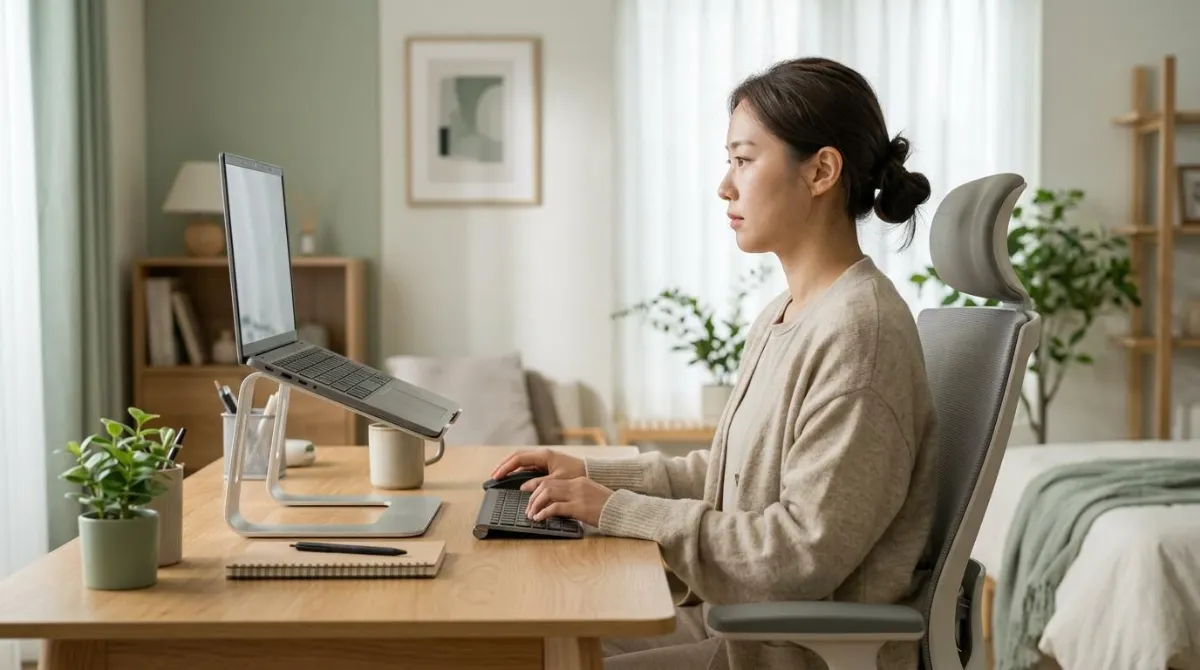
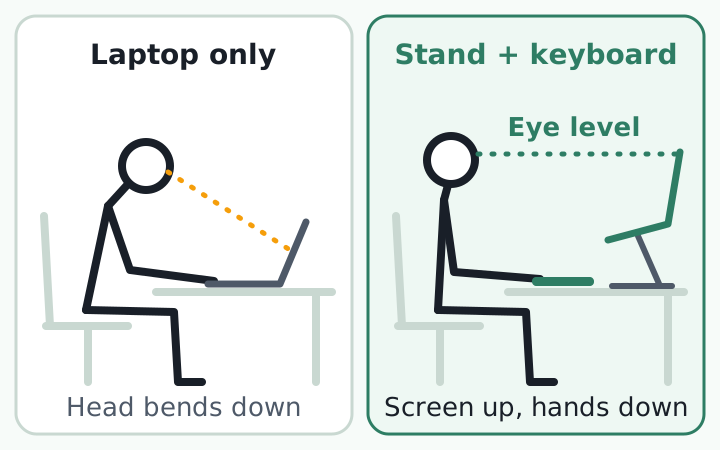
A laptop stand is good ergonomics only as half of a pair. Raise the screen until its top edge sits at or slightly below eye level, then type on an external keyboard and mouse that stay on the desk.89 If you raise the laptop and keep typing on its built-in keys, your neck bends less but your wrists bend more.4
This guide covers how high to go, what the research measured, and what to do about laptop neck pain in places where a full setup isn't possible.
Why a laptop can't fit your eyes and your hands at once
A screen is comfortable near eye height. A keyboard is comfortable near elbow height. On a laptop the two are joined by a hinge, so when the keys suit your hands the screen is low, and when the screen suits your eyes the keys are high.1
The reason is simple - with a fixed design, if the keyboard is in an optimal position for the user, the screen isn't and if the screen is optimal the keyboard isn't.
Alan Hedge, Professor, Cornell University, "5 Tips for Using a Laptop Computer," 2015
Researchers at the University of Newcastle in Australia used 3D motion capture on 30 people doing an editing task while seated. With a laptop, their necks flexed 10.9 degrees more on average than with a desktop computer.2 A 1997 comparison from Curtin University also found more neck flexion and head tilt with the laptop.12
Both studies measured joint angles, not pain. In the 1997 experiment, discomfort after 20 minutes looked higher with the laptop, but the difference was not statistically significant.12
What studies of laptop stands actually found
Few experiments have tested laptop stands directly. Three have clear methods.
| Study | Who and how | Result |
|---|---|---|
| Yadegaripour et al., 20213 | 20 healthy young men, two 8-minute sessions, riser set to each person's height plus external keyboard | Neck flexion down 4.5 degrees, upper-back flexion down 3.1 degrees, cervical erector spinae activity down 10 percent and multifidus activity down 16 percent, lower discomfort |
| Asundi et al., 20124 | 15 people, 10 minutes each: flat, 12-degree tilt, 25-degree tilt, full riser with external keyboard and mouse | More tilt meant less neck flexion but more wrist extension. The 25-degree tilt rated least comfortable |
| Jacobs et al., 20116 | University students randomized to a chair, monitor, or notebook riser, each with wireless keyboard, mouse, and training | Less discomfort with the riser in surveys, but limited benefit after adjusting for hours of use |
The two lab studies point the same way: a higher screen means less neck flexion, and typing on the raised laptop means more wrist extension. That is the case for separating the keyboard. But the sessions lasted 8 to 10 minutes, and one study enrolled only healthy young men. None of this shows what happens after months of use.
Whether new equipment reduces pain is a separate question. A 2018 Cochrane review pooled 15 randomized trials with 2,165 office workers. The one trial of workstation adjustment showed no effect on upper limb pain or discomfort.7 Extra breaks did reduce discomfort, though that evidence was rated very low quality.7 A stand makes a better posture possible; it does not hold you in it.
How high should a laptop stand be?
Public guidance agrees closely. Put the top edge of the screen at eye level or a little below it.
| Source | Screen height | Viewing distance |
|---|---|---|
| OSHA8 | Top of screen at or slightly below eye level; center of screen 15 to 20 degrees below horizontal eye level | 20 to 40 in (50 to 100 cm) |
| HSE, UK9 | Top of screen level with eyes | About an arm's length |
| Mayo Clinic11 | Top of screen at or slightly below eye level | 20 to 40 in (50 to 100 cm) |
These numbers were written for monitors but apply equally to a laptop on a stand. Higher is not better. When a screen sits above eye level you tilt your head back, and holding that position tires the muscles that support your head.8
Measure your own lift in two minutes
- Sit the way you normally work and measure from the desktop up to your eyes (A).
- Open the laptop on the desk and measure from the desktop up to the top edge of the screen (B).
- A minus B is the most you should raise the laptop.
- If text now looks small, increase the display scaling. A screen that is too far away makes you lean forward to read.8
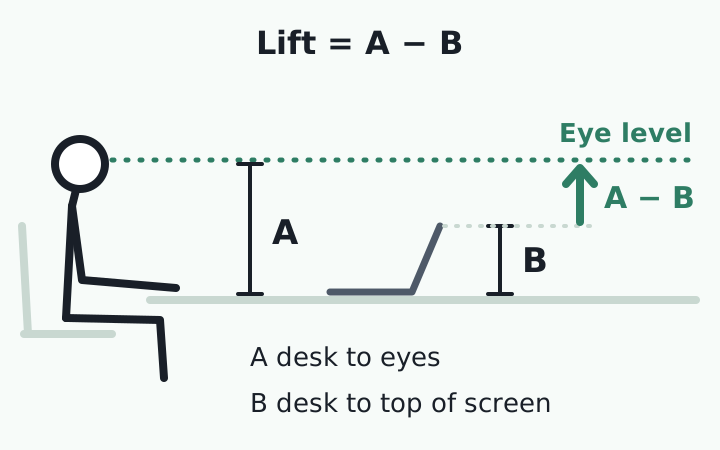
For example, if A is 18 in (46 cm) and B is 9 in (23 cm), you can raise the laptop up to 9 in (23 cm). Compare that number with the height listed on a product page.
Most folding stands only prop up the back edge. By our own calculation (depth times the sine of the tilt angle), a laptop 8.7 in (22 cm) deep tilted to 12 degrees lifts its back edge about 1.8 in (4.6 cm); at 25 degrees, about 3.7 in (9.3 cm). That often falls short of eye level.
If you wear bifocals, set the screen 1 to 2 inches (about 2 to 5 cm) lower so you don't lift your chin to read through the bottom of the lens.811
Where the external keyboard and mouse go
Once the screen is up, give your hands their own place. Typing on a raised laptop lifts your arms and bends your wrists back. That is why the UK Health and Safety Executive's first point for prolonged laptop use is a separate keyboard and mouse, so the screen can go on a riser.9
- Elbows close to your body and bent between 90 and 120 degrees10
- Keyboard and mouse at or slightly below elbow height10
- Wrists and hands straight, not bent up or turned to the side10
- Shoulders relaxed. If you have to shrug to reach the keys, sit higher9
- Mouse in line with your elbow, right next to the keyboard9
For the mouse side of the setup, see vertical mice and wrist posture. All of this assumes your chair and desk heights are already right. If not, start with monitor, desk, and chair height by body size.
Portable laptop stands and setups without a keyboard
In a cafe, hotel room, or meeting room you probably won't unpack a keyboard, and raising the screen all the way then costs your wrists. A team at the Harvard School of Public Health tested this trade-off.
Fifteen people worked for 10 minutes in each setup. A 12-degree tilt reduced head tilt and neck flexion while keeping wrist extension acceptable. A 25-degree tilt straightened the neck further but got the lowest comfort and ease-of-use ratings and the highest discomfort score. The authors suggested the 12-degree tilt for temporary setups where you use the built-in keyboard.4
| Situation | Setup | Based on |
|---|---|---|
| At a desk for more than an hour | Stand with screen top near eye level, external keyboard and mouse | UC Berkeley10, 20-person study3 |
| Cafe or meeting room, short session | About 12 degrees of tilt, built-in keyboard | 15-person study4 |
| No desk, laptop on your lap | Lap desk or binder, wrists straight, keep it short | 15-person study5, UC Berkeley10 |
The lap is the hardest place to work. In a study of 15 adults, moving the laptop from a desk to the lap increased downward head tilt by 6 degrees and wrist extension by 8 degrees. A lap desk gave back 4 degrees of head tilt and 9 degrees of wrist extension, yet every setup still produced large wrist and head angles.5
Alan Hedge of Cornell splits his advice by use. For occasional use, protect your wrists first and accept some neck bend, because head and neck position is controlled by large muscles. If the laptop is your main computer, raise the screen and use a separate keyboard and mouse. If you carry your setup, count the weight: he suggests a wheeled bag once the laptop and accessories reach 10 pounds.1
What to look for in a laptop stand
- Lift: does it reach your A minus B measurement?
- Stability: the screen should not bounce when you touch it or lean on the desk.
- Size and load: your laptop's size and weight should fall within the listed range.
- Airflow: the platform should not cover the vents under your laptop.
- Portability: if you carry it, check the weight and folded thickness.
An adjustable stand is worth it mainly if several people share the desk or you switch between sitting and standing. For one person at one desk, a fixed stand that matches your measurement is enough, and any stable support works, including a monitor riser, reams of paper, or phone books.10 If you plan to add a second screen, see monitor stand vs. monitor arm.
If neck or shoulder pain, arm numbness or tingling, hand weakness, or dizziness lasts more than a few days, see a doctor instead of changing equipment again. This guide covers workspace setup and does not replace medical care.
If you work from cafés, keep a folding stand and a compact keyboard in your bag together. Raising the screen first becomes part of how you start, wherever you work.
After the setup: noticing when your head drifts forward
In lab testing, a laptop stand reduced neck and upper-back flexion when the screen was set to the user's height and paired with an external keyboard. Without a keyboard, a tilt of about 12 degrees is the compromise. Three things to check at your desk today:
- Measure desk-to-eye and desk-to-screen-top heights and note the difference
- With hands on the external keyboard, check that your shoulders are down and elbows open to at least 90 degrees
- Set a reminder to stand up at least once an hour
One problem remains. Even with the screen at the right height, your head moves back toward it once you are absorbed in work, and that moment is hard to notice on your own. In the university trial, four hours of daily laptop use was a confirmed risk factor for discomfort, so time and habits count as much as hardware.6
So the part you can work on at your desk is the habit of noticing when your head has moved forward and bringing it back. For how often to pause, see the desk break timing guide.
RightPose AI is a desktop app for Windows and Mac. It uses the webcam on your laptop or monitor to check your posture briefly at an interval you set (5 minutes by default) and alerts you on screen when it detects forward head posture. You register your own good posture first, and the app judges against that. It shows your camera view with joint lines so you can reset your posture yourself. Camera images are processed on your device and are not sent off it. It also reminds you to stretch and stand up at set intervals.
Wherever you work, you can start by registering your good posture with your laptop's webcam.
RightPose AI is not a medical device. It is a habit tool that notices your posture and nudges you to reset and stretch.
FAQ
Are laptop stands worth it for neck pain?
A stand raises the screen, and lab studies show that this reduces how far the neck bends. Whether that change prevents or reduces symptoms has not been established, and the researchers who measured it say more work is needed.2 Think of a stand as a way to make a less bent posture possible, not as a remedy. If pain or numbness continues, see a doctor.
Can I use a stack of books instead of a laptop stand?
Yes. UC Berkeley's guidance lists monitor risers, reams of paper, and phone books as examples of a stable support surface.10 Make sure the stack doesn't wobble or block the vents. Trying books for a few days is also a simple way to find your height before you buy anything.
Do I still need a laptop stand if I have an external monitor?
If the monitor is your main screen and you use a separate keyboard and mouse, you already have a desktop-style setup. HSE lists a separate display as one of its two points for prolonged laptop use.9 UC Berkeley's guidance is to use a laptop stand if you don't use an external monitor.10 If you keep the laptop open as a second screen, a stand brings it up so you look down less often.
How many hours a day on a laptop is too many?
There is no agreed cutoff. One university trial confirmed four hours of daily notebook use as a risk factor for discomfort.6 UC Berkeley draws its line at one hour: beyond that, it advises raising the screen and adding a keyboard and mouse.10 The Cochrane review found that extra breaks reduced discomfort, though the evidence was very low quality.7
References
- 5 Tips for Using a Laptop Computer
- Differences in posture kinematics between using a tablet, a laptop, and a desktop computer in sitting and in standing
- The Effect of Adjusting Screen Height and Keyboard Placement on Neck and Back Discomfort, Posture, and Muscle Activities during Laptop Work
- Changes in posture through the use of simple inclines with notebook computers placed on a standard desk
- Notebook computer use on a desk, lap and lap support: effects on posture, performance and comfort
- University students' notebook computer use: lessons learned using e-diaries to report musculoskeletal discomfort
- Ergonomic interventions for preventing work-related musculoskeletal disorders of the upper limb and neck among office workers
- Computer Workstations eTool: Monitors
- Working safely with display screen equipment: Good posture when using display screen equipment
- Ergonomic Tips for Laptop Users
- Office ergonomics: Your how-to guide
- A comparison of the postures assumed when using laptop computers and desktop computers
This article is for general information only and is not a substitute for medical diagnosis or treatment. If pain persists or worsens, consult a medical professional.