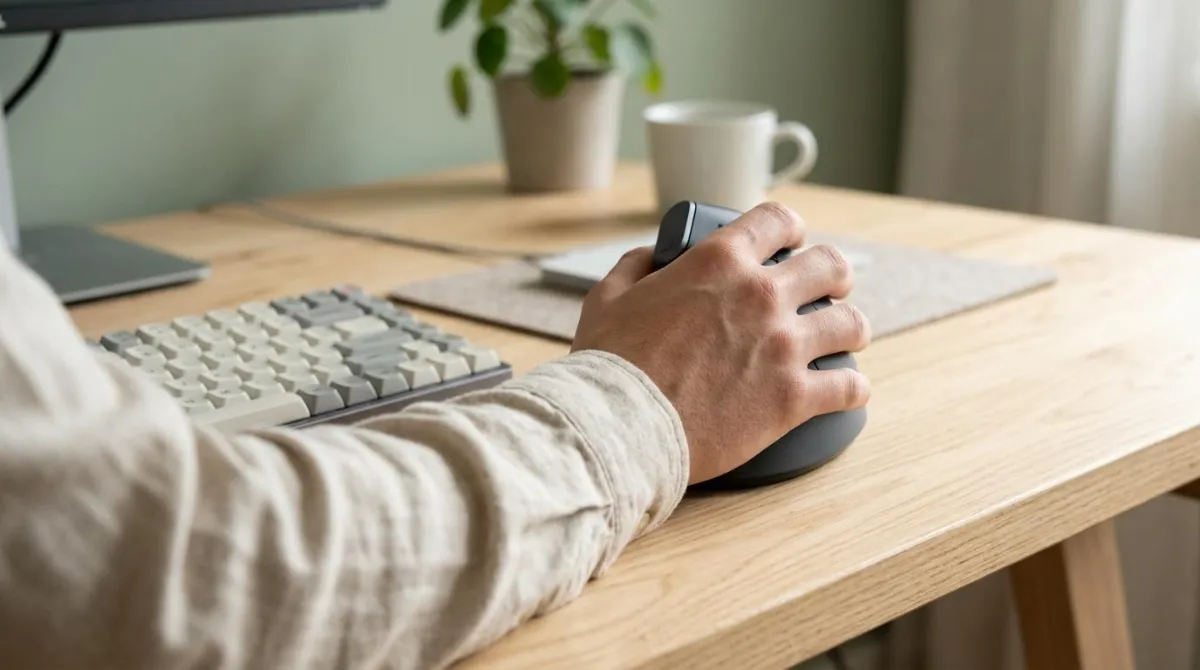
A vertical mouse changes how your forearm sits: it cuts the twist you hold with a flat mouse. But we found no study showing that it lowers the pressure inside your carpal tunnel, and one patient study found it bent the wrist back further. If your wrist hurts, where you put the mouse and how long you use it matter as much as its shape.
Below you'll find what vertical mouse ergonomics actually changes in lab measurements, what it doesn't, what the research says about computer use and carpal tunnel syndrome, and a short checklist for buying and placing a mouse.
What a vertical mouse changes: forearm rotation
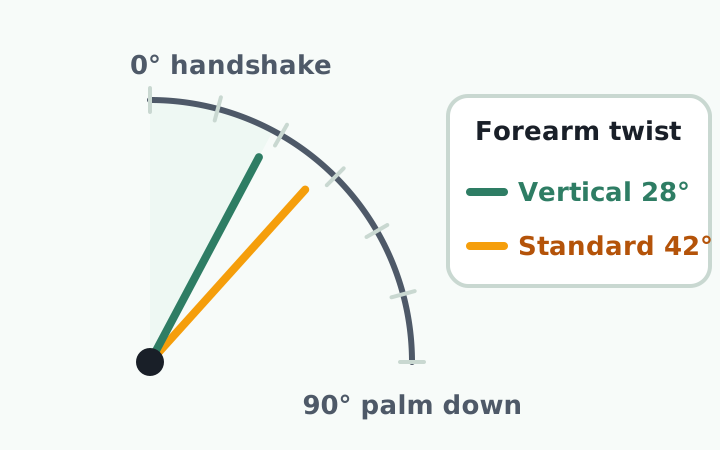
To hold a flat mouse, you turn your palm down. That rotation is called pronation. A vertical mouse lets you hold your hand in a handshake position, so your forearm rotates less.1
Researchers at the University of Franca in Brazil measured 16 people with electrogoniometers and EMG. Forearm pronation was 28 degrees with a vertical mouse and 42 degrees with a standard one. Wrist extensor activity was 13% versus 16%. The trade-off: reaching a target took 4.2 seconds instead of 3.4.2
| Study | Who | Vertical mouse result | Trade-off |
|---|---|---|---|
| Quemelo 20132 | 16 adults | 28° vs. 42° pronation, less extensor activity | Slower pointing |
| Gustafsson 20033 | 19 experienced office workers | Less forearm extensor activity | Lower productivity and comfort |
| Odell 20154 | 12 adults, 5 mice | Fully vertical mouse cut pronation | Poorest pointing performance |
| Schmid 20151 | 21 people with CTS | Less ulnar deviation | More wrist extension |
Dan Odell of Synaptics, a touchpad maker, and Peter Johnson of the University of Washington School of Public Health tested flat, angled, and fully vertical designs. Angled concept mice reduced pronation with no loss in pointing performance, while the fully vertical one had the poorest performance.4 With one author at a hardware company and only 12 participants, treat it as a design study rather than the final word.
What it doesn't change: carpal tunnel pressure
The carpal tunnel is a narrow channel at the base of your palm. The median nerve and finger tendons run through it. When pressure inside stays high, the nerve is thought to suffer. David Rempel's lab at UCSF measured that pressure directly with a thin catheter in 14 healthy people using three standard mice.5
Dragging averaged 28.8 to 33.1 mmHg, about 12 mmHg higher than resting the hand on the mouse. The three mice didn't differ. The team advised minimizing wrist extension and long dragging tasks, and giving the mousing hand other tasks often.5
In 2015, a team from the University of Queensland and the University of Oxford ran the same kind of measurement in 21 patients with carpal tunnel syndrome. The vertical mouse cut ulnar deviation (bending toward the little finger) from 16.9 to 5.8 degrees. But wrist extension rose from 14.9 to 29.3 degrees.1
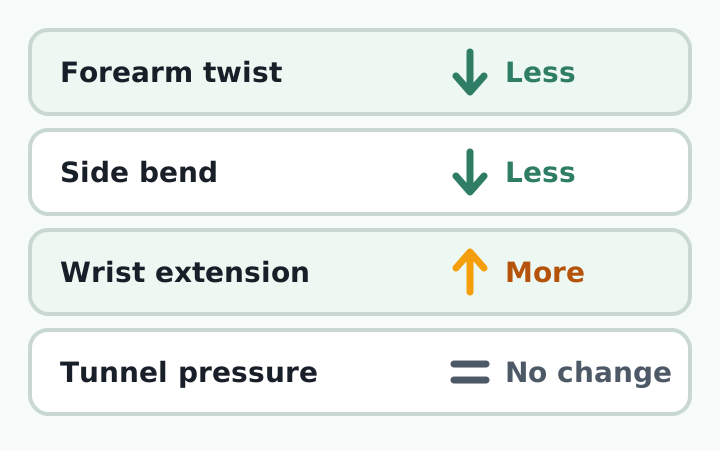
Mean pressure was 48.9 mmHg with the standard mouse and 66.2 mmHg with the vertical one, a difference that was not statistically significant. Every device stayed above 30 mmHg, a level the authors cite as interfering with nerve function. Comfort scores were similar, 5.7 versus 6.0.1 The authors suggest the benefit of a neutral forearm may have been canceled out by the more extended wrist.
Selection of ergonomic devices remains dependent on personal preference.
Annina Schmid et al., University of Queensland and University of Oxford, Applied Ergonomics, 2015
Keep the limits in mind. Each task lasted five minutes, people had five minutes to get used to one vertical model, and participants weren't all office workers.1 Nobody has yet measured pressure after weeks of use.
Does computer use cause carpal tunnel syndrome?
Probably not in a big way, but the evidence is split. Large studies point in different directions depending on who they compare.
| Study | Population | Finding |
|---|---|---|
| Andersen 2003, Denmark6 | 5,658 union members, 1 year | Linked to mouse use over 20 h/week; not to keyboard use |
| Thomsen 2008, review7 | 8 epidemiological studies | Insufficient evidence that computer work causes CTS |
| Mediouni 2014, meta-analysis8 | 6 studies | No clear association (mouse OR 1.94, CI 0.90 to 4.21) |
| Shiri 2015, meta-analysis9 | 6 studies within office workers | Mouse use linked (OR 1.93) |
In the Danish study, interview-confirmed symptoms in the median nerve area appeared in 4.8% of people. The authors concluded that computer use "does not pose a severe occupational hazard" for these symptoms.6 Those were possible cases based on questionnaires and interviews, not nerve conduction tests.
Rahman Shiri of the Finnish Institute of Occupational Health pooled 12 studies. Compared with the general population, computer users actually had lower odds. Within office workers, heavy mouse use was linked to higher odds. He concluded that mouse use "might be a minor occupational risk factor" and called for studies confirmed by nerve testing.9
Wrist pain from a mouse: carpal tunnel or tendon?
Not all wrist pain from mouse use is the same problem. Carpal tunnel syndrome is a squeezed nerve. De Quervain's tendinosis affects two tendons on the thumb side of the wrist.11
| Carpal tunnel syndrome | De Quervain's tendinosis | |
|---|---|---|
| Main feeling | Numbness, tingling | Pain, swelling |
| Where | Thumb, index, middle, part of ring finger10 | Thumb side of the wrist11 |
| Worse with | Night, waking up | Gripping, twisting, thumb movement |
| Common factors | Repetitive use, wrist position, pregnancy, diabetes10 | Typing, texting, lifting; after pregnancy11 |
The American Academy of Orthopaedic Surgeons notes that untreated carpal tunnel syndrome can lead to permanent loss of hand function, and that nerve tests also check whether the nerve is compressed somewhere other than the wrist.10 Matching your symptoms to a table is not a diagnosis.
If finger numbness lasts more than a few weeks, wakes you at night, or you start dropping things, see a doctor before you shop for a new mouse. The NHS also advises getting checked if symptoms get worse or don't improve.12
How to choose a vertical mouse: 5 criteria
You'll often see claims that one specific angle is ideal for the wrist. We couldn't find independent research backing a single number. Judge the fit for your hand and your work instead of the brand.
- Hand size: your whole hand should rest on it. OSHA advises choosing a size that fits and testing a device before you buy.14
- Tilt: fully vertical and angled models exist. Angled designs reduced pronation without hurting performance in one study.4
- Height and thumb rest: check that your wrist doesn't bend back. A vertical mouse increased wrist extension in the patient study.1
- Button force: buttons should click lightly. CCOHS advises holding the mouse loosely, without squeezing.13
- A switch-in plan: you'll be slower at first.2 Switch on a lighter day and save precision work for later.
Building better habits? Add one line to your daily routine: after lunch, slide the mouse back next to the keyboard and check that your elbow is by your side.
Mouse placement matters as much as shape
Agencies phrase it differently, but they agree on the basics: keep the mouse close, keep the wrist straight, and move from the elbow.
| Source | Guidance |
|---|---|
| OSHA14 | Keep the mouse close to the keyboard; reach the whole screen with a straight wrist |
| OSHA14 | Alternate hands and use keyboard shortcuts |
| CCOHS15 | A 14-inch keyboard instead of an 18-inch one frees about 4 inches for the mouse |
| CCOHS13 | Move the mouse from the elbow, not just the wrist |
- The mouse sits right next to the keyboard and you don't reach forward
- Your elbow rests by your side, bent at 90 degrees or a little more
- Pointer speed is high enough that small movements reach the screen edges
- Long drags are replaced with shortcuts where you can
Wrist rests are a mixed bag. CCOHS says research on them is inconclusive and that using one incorrectly can put more pressure on the carpal tunnel.13 For desk and chair heights, see our home office setup guide. For break timing, see how often to take desk breaks.
Equipment alone did less than many people expect. A Cochrane review of 15 trials in office workers found that an alternative mouse by itself didn't clearly reduce neck, shoulder, or arm disorders. Combined with an arm support, it reduced neck and shoulder disorders (moderate-quality evidence).16
A UCSF trial followed 206 engineers for a year. The alternative mouse group had fewer right arm disorders, but not significantly. The forearm support board reduced right arm discomfort.17 A follow-up nerve study found no effect of the mouse on the median nerve, the nerve involved in carpal tunnel syndrome.18 If you code all day, this developer desk posture guide covers the rest of your setup.
After the new mouse: noticing when your posture drifts
A vertical mouse reduces forearm rotation, may bend your wrist back more, and hasn't been shown to lower carpal tunnel pressure. Placement, grip, and breaks matter as much as the shape of the device.
The catch is that a good setup drifts once you're focused. As you lean toward the screen, your mouse arm reaches forward with you, and you rarely notice it happening. What you can do at your desk is build the habit of noticing when your head moves forward, and resetting.
RightPose AI is a desktop app for Windows and Mac. It doesn't watch your wrist. It uses your laptop or monitor webcam to check your posture at a set interval (every 5 minutes by default) and shows an alert on screen when your head moves forward. That alert is a good moment to pull your mouse arm back too. Camera images are processed on your device and never leave it.
If you're building a better daily routine, register your own good posture first, then let each alert remind you to bring your head and your mouse back in.
RightPose AI is not a medical device. It is a habit tool that notices your posture and nudges you to reset and stretch.
FAQ
How long does it take to get used to a vertical mouse?
No study has measured an adjustment period directly. In lab tests people were slower at first, and the researchers said extra training and familiarization time may be needed.2 If your wrist still bends back or feels worse after a few days, try a different tilt or size.
Is a vertical mouse good for carpal tunnel syndrome?
It hasn't been shown to help. In a study that measured carpal tunnel pressure in patients, the vertical mouse didn't lower it, and comfort was about the same as a standard mouse.1 Choose based on comfort, and get diagnosed if numbness continues.
Should I wear a wrist brace for mouse pain?
For carpal tunnel syndrome, the usual advice is a splint at night so your wrist doesn't bend while you sleep, and the NHS says it may take up to 6 weeks to feel better.12 A Cochrane review of 29 studies still found insufficient evidence to say whether splinting helps.19
References
- A vertical mouse and ergonomic mouse pads alter wrist position but do not reduce carpal tunnel pressure in patients with carpal tunnel syndrome
- Biomechanics and performance when using a standard and a vertical computer mouse
- Computer mouse use in two different hand positions: exposure, comfort, exertion and productivity
- Evaluation of flat, angled, and vertical computer mice and their effects on wrist posture, pointing performance, and preference
- Effects of computer mouse design and task on carpal tunnel pressure
- Computer use and carpal tunnel syndrome: a 1-year follow-up study
- Carpal tunnel syndrome and the use of computer mouse and keyboard: a systematic review
- Is carpal tunnel syndrome related to computer exposure at work? A review and meta-analysis
- Computer use and carpal tunnel syndrome: A meta-analysis
- Carpal Tunnel Syndrome
- De Quervain's Tendinosis
- Carpal tunnel syndrome
- Mouse: Selection and Use
- Computer Workstations eTool: Pointer/Mouse
- Mouse: Placement
- Ergonomic interventions for preventing work-related musculoskeletal disorders of the upper limb and neck among office workers
- A randomised controlled trial evaluating an alternative mouse and forearm support on upper body discomfort and musculoskeletal disorders among engineers
- A randomized controlled trial evaluating an alternative mouse or forearm support on change in median and ulnar nerve motor latency at the wrist
- Splinting for carpal tunnel syndrome
This article is for general information only and is not a substitute for medical diagnosis or treatment. If pain persists or worsens, consult a medical professional.