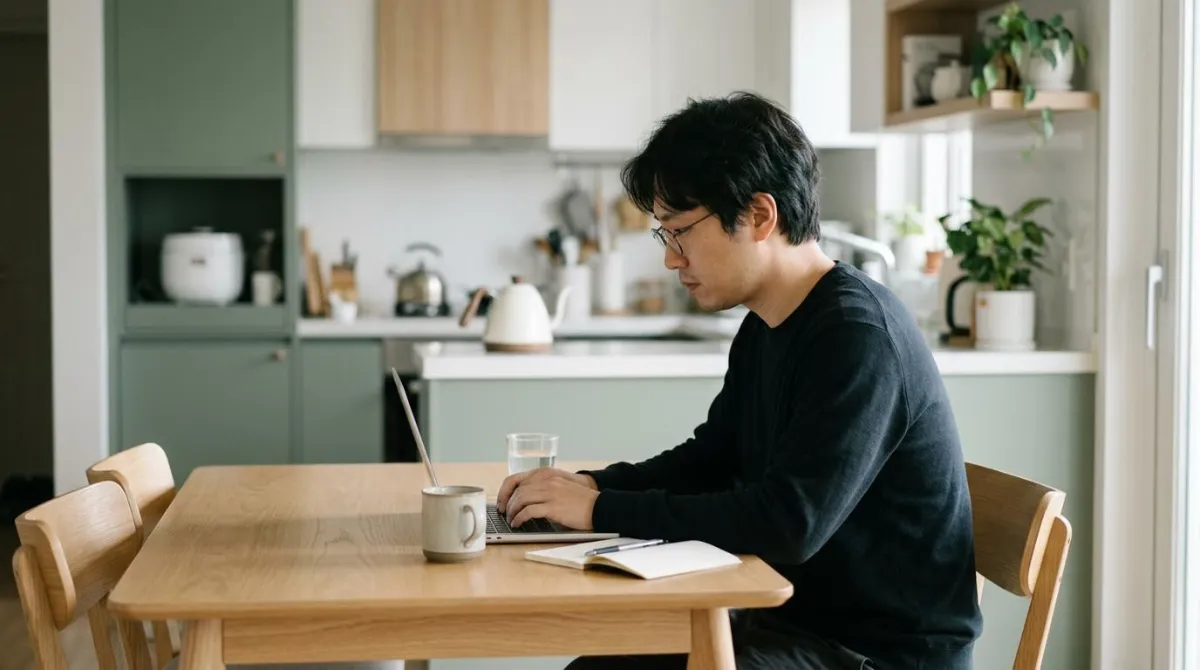
Work from home posture slips for two reasons: where you sit and how long you stay there. Working on a laptop from the sofa or bed, with no table, bends your neck the most,3 and even at a properly adjusted workstation, a few hours in one position let the neck drift forward.11 This guide covers both, then fits the adjustments into an hour-by-hour day.
For desk and monitor heights, see our home office setup guide. For break lengths, see how often to get up. Here the focus is on where those habits go in your day.
WFH ergonomics studies: what home workers reported
Since 2020, many surveys have asked home workers about pain. In an Australian-led survey of 511 frequent computer users, 80% said they worked from home more than before and 89% reported some musculoskeletal pain.5 In a Croatian telecom company, 232 staff were surveyed after eight months at home: 45.7% said neck and upper back pain was worse than at the office, and 39.1% said the same of low back pain.4
That Croatian pilot also counted setups. 37.7% had no separate workspace (30 of them worked mostly in the dining room), 40.9% had no office desk, only 29.9% took frequent breaks, and 52% worked longer hours at home.4 It was one company, so treat the numbers as a snapshot.
| Study | Who | What it found |
|---|---|---|
| Snodgrass et al., 2022 | 511 frequent computer users | 89% reported pain. Work location linked to upper back pain, posture to headache and low back pain5 |
| Radulović et al., 2021 | 232 telecom employees | Neck and upper back pain worse for 45.7%, low back for 39.1%4 |
| Du et al., 2022 | 4,112 home workers in Japan | Pain linked to some furniture, not others1 |
| Casjens et al., 2025 | 1,064 computer workers in Germany | Longer remote hours and poorer setups raised the risk of new neck or upper back pain (odds ratio 2.02)7 |
The results do not line up neatly. A rapid review of six studies found neck pain rates anywhere from 20.3% to 76.9%.6 The German team saw only a trend toward more pain when working from home compared with office-only work.7 These are mostly self-reported surveys, so they show links, not proof that home work causes pain. An odds ratio compares how often something shows up in two groups, and anything above 1 means more often in the first.
Kitchen table, sofa or bed: how far does your neck bend?
A large survey on home furniture came from Japan's National Institute of Occupational Safety and Health. Among 4,112 home workers, about 20% used a low table, a floor chair, a floor cushion or other furniture unlike an office setup. A table of the wrong size and height, a sofa, a floor cushion and a floor chair were all linked to neck, shoulder or low back pain.1 A standard dining table was not on that list.
A Thai-led lab study put numbers on the neck. Twenty men aged 18 to 25 used a laptop for 10 minutes each at a low table, a sofa and a bed while sensors tracked their neck angle.3
| Where the laptop sat | Neck flexion | Also found |
|---|---|---|
| Low table | 7.8° | Shoulder flexion 28.2°, the highest; upper back pain3 |
| Bed | 17.2° | Neck pain3 |
| Sofa | 18.6° | Neck pain3 |
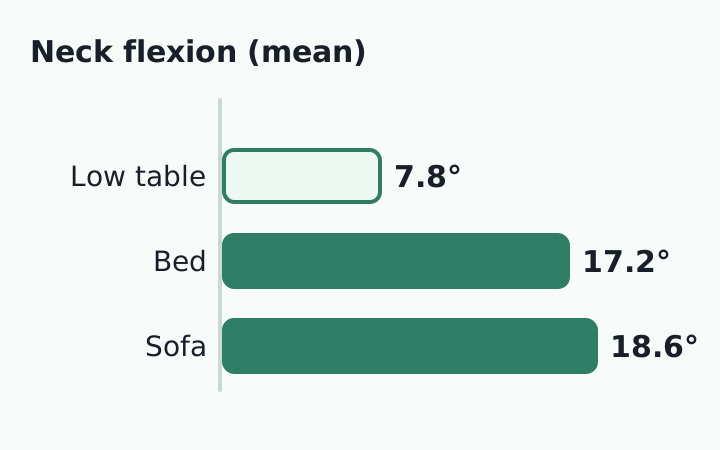
A second Japanese lab test, with 21 healthy adults working 30 minutes in each of seven setups, found that a low table with a floor chair and laptop produced upper-body posture similar to a dining table, chair and desktop. Sitting on a sofa produced severe neck flexion, and a floor cushion with a laptop bent the low back too far. The authors concluded that sofa or floor-cushion work without a backrest is hard on the neck and low back.2
Both tests were small and short, so they say little about a full day. Plenty of health sites also warn against typing while lying on your stomach, but we did not find a study that measured that position.
A posture check that fits any table
The UK Health and Safety Executive (HSE) says home workers need a comfortable, sustainable posture, and may not need office furniture to get it.9 Its standard checklist works on a kitchen table:
| Check | HSE guidance |
|---|---|
| Screen | Top of screen level with eyes, about an arm's length away8 |
| Keyboard | Just below elbow height, mouse in line with the elbow8 |
| Seat | Supports both front and back of thighs, or use a cushion to raise your seat8 |
| Back | Good lower back support, or a cushion for extra support8 |
| Laptop | Separate keyboard and mouse, so the screen can be raised on a riser8 |
Propping the screen on a stack of books and adding a separate keyboard covers most of that list. Check your seat height by looking for a 2 to 3 cm gap between the seat's front edge and the back of your knee.8
A work-from-home daily routine, hour by hour
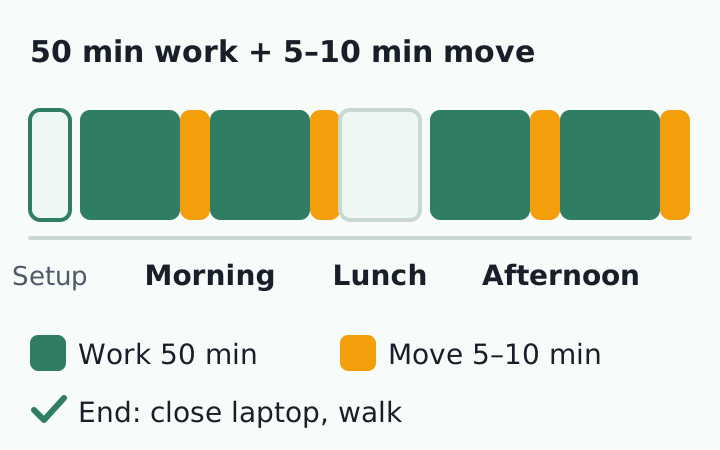
Without a commute, the day loses its landmarks. The routine below puts agency guidance into each slot. The timings are an example we built to be easy to follow, not values set by research.
| Time of day | What to do | Basis |
|---|---|---|
| Before work, 10 min | Get dressed. Check screen height, keyboard and feet, then sit | HSE checklist8 |
| Morning block 1 | Work about 50 minutes, then get up for 5 to 10 | HSE breaks10 |
| Morning block 2 | Take calls or read paper standing, or in another spot | Mix in non-computer tasks17 |
| Lunch | Eat, then step outside and walk | Fewer steps on home days14 |
| Afternoon block 1 | Switch between sitting and standing; recheck screen height | Both long sitting and long standing are a problem18 |
| Late afternoon | Do not skip breaks; shorten your timer | Neck flexion grew over 3 hours11 |
| Log-off | Write tomorrow's list, close the laptop, walk 10 minutes | 52% worked longer hours at home4 |
Why the afternoon slumps: hours in one position
Researchers in Thailand adjusted the workstations of 70 female office workers to US Occupational Safety and Health Administration (OSHA) guidelines, then measured their neck angle every 20 minutes for 3 hours. In both groups, with and without symptoms, the neck bent more as time passed.11 In a lab at Curtin University in Australia, 20 people sat at a computer for 2 hours and discomfort rose in every body area.12 OSHA itself explains why: holding a still posture while watching a monitor tires the neck and shoulder muscles that hold up your head.17
That is why the HSE says short, frequent breaks beat long, rare ones: 5 to 10 minutes every hour is better than 20 minutes every 2 hours.10 The evidence for breaks is thin, though. A 2025 Cochrane review pooled 9 trials with 626 workers, 98% of them office workers, and judged the effect of extra breaks on neck and back pain very uncertain. None of the trials compared break lengths.13 That means better studies are still needed, not that breaks are useless. If you like timers, the Pomodoro guide shows how to use one.
Do home workers sit more and walk less?
A 2025 meta-analysis from Germany's federal occupational safety institute pooled 38 studies and 282,264 people. Working from home added about 31 minutes of sitting during work hours and cut about 2,564 steps a day. Each figure pooled 7 studies, results varied widely, and 31 of the 38 studies ran during the pandemic.14 A survey of 1,239 Tokyo workers found 335.7 minutes of sitting during work for home workers against 224.7 for commuters.15
One 2026 study found a different pattern. It fitted thigh sensors to 111 hybrid workers for 8 days. Sitting time did not differ between home and office days, but steps did: 7,519 on home days against 9,303 at the office.16 Sitting varies by person, yet the drop in walking shows up across studies.
Both sitting and standing for long periods of time is problematic.18
Jodi Oakman, head of the Centre for Ergonomics and Human Factors, La Trobe University, ABC News interview, 2020
Add one line to your daily routine: before you start work, spend 10 minutes checking screen height, keyboard and feet, and stand up once an hour.
No desk? Four stopgaps for a small home
If you pick up a side gig after your day job, those extra hours land at the end of an already long day, often on the sofa. In the German survey, longer remote hours went with more pain.7 Plan break slots for that extra block too.
- Raise the laptop on a firm stack of books and use a separate keyboard and mouse8
- At a kitchen table, add a cushion to lift your seat and match the table to your elbows8
- On the floor, use a seat with a backrest and a low table, not a cushion alone2
- Keep the sofa and bed for short reads and replies; move longer work to the table3
If neck or shoulder pain comes with arm or hand numbness, weakness or dizziness that does not go away, see a doctor rather than rearranging your furniture. This routine is general information, not a diagnosis or treatment. See when to see a doctor for neck pain.
A schedule helps, but nobody is watching your posture
We found two things. At home, the risky seats were the sofa, bed and cushion setups, not the dining table, and the neck bent further the longer people sat without a break.
What remains is that knowing does not help once you are absorbed in work. At an office, a colleague walking by might nudge you. Working alone at home, nobody sees you slump, and you will hardly notice your head creeping forward. What you can do at your desk is notice the moment your head drifts forward and bring it back, until that becomes a habit.
RightPose AI is a desktop app for Windows and Mac. Using your laptop or monitor webcam, it briefly checks your posture at an interval you set (every 5 minutes by default) and tells you on screen if you are in a forward head posture. You first register your own good posture and your forward head posture, and it judges against those. Your image and joint lines show on screen so you can reset yourself. Camera images are processed on your device and never leave it.
It also sends reminders to get up and stretch at intervals you pick, with a stretch screen you can follow, which helps on days the break slots in your schedule slip by. RightPose AI is not a medical device. It is a habit tool that notices your posture and nudges you to reset and stretch. If you're building a better daily routine, register your own good posture first and start from there.
FAQ
How high should my kitchen table be?
The HSE gives no table height. It says to put the keyboard just below elbow height and, if your seat is too low, use a cushion to raise it.8 Sit, let your arms hang, and note where your elbows land. The keyboard should sit just below that line, so raise or lower your seat to match.
Is there a daily limit on sitting time?
We did not find a daily total. The HSE says there is no legal guidance on how long or how often breaks should be for screen work, but short and frequent beats long and rare.10 The practical rule is to break up sitting, not to count hours.
Does pain from working at home fade by itself?
It varies. Australian and Finnish researchers followed 488 home workers over three surveys from October 2020 to November 2021. Pain stayed high for 36.5%, fell from a middle level for 29.7%, stayed low for 22.3% and rose quickly for 11.5%. Lower workstation comfort made the high-and-steady group more likely (odds ratio 1.98).19 See a doctor if pain lasts.
Can I ask my employer to pay for a chair or monitor?
It depends on where you live. In the UK, the HSE says that if a home DSE assessment shows equipment is needed, workers cannot be charged for it.9 We did not check the rules for other countries.
References
- Computer and Furniture Affecting Musculoskeletal Problems and Work Performance in Work From Home During COVID-19 Pandemic
- Relationship between using tables, chairs, and computers and improper postures when doing VDT work in work from home
- Analysis of neck and shoulder postures, and muscle activities relative to perceived pain during laptop computer use at a low-height table, sofa and bed
- Work from home and musculoskeletal pain in telecommunications workers during COVID-19 pandemic: a pilot study
- Relationships Between the Physical Work Environment, Postures and Musculoskeletal Pain During COVID-19: A Survey of Frequent Computer Users
- Work from home-related musculoskeletal pain during the COVID-19 pandemic: A rapid review
- Changes in Musculoskeletal Pain Among Computer Workers When Working From Home
- Working safely with display screen equipment: Good posture
- Working safely with display screen equipment: DSE for home workers
- Working safely with display screen equipment: Work routine and breaks
- A comparison of neck and shoulder postures in symptomatic and asymptomatic female office workers in the actual work environment
- The Short Term Musculoskeletal and Cognitive Effects of Prolonged Sitting During Office Computer Work
- Work-break interventions for preventing musculoskeletal symptoms and disorders in healthy workers
- The impact of working from home on sedentary behaviour and physical activity compared to onsite work in the working population: a systematic review and meta-analysis
- Associations of working from home with occupational physical activity and sedentary behavior under the COVID-19 pandemic
- Impacts of working from home on sedentary behaviour, physical activity and diet in the post-pandemic era: a within-subject measures study in hybrid workers
- Computer Workstations eTool: Work Process and Recognition
- Working from home during coronavirus shutdown? These hacks may help keep ease the pain of your home office
- Musculoskeletal pain trajectories of employees working from home during the COVID-19 pandemic
This article is for general information only and is not a substitute for medical diagnosis or treatment. If pain persists or worsens, consult a medical professional.