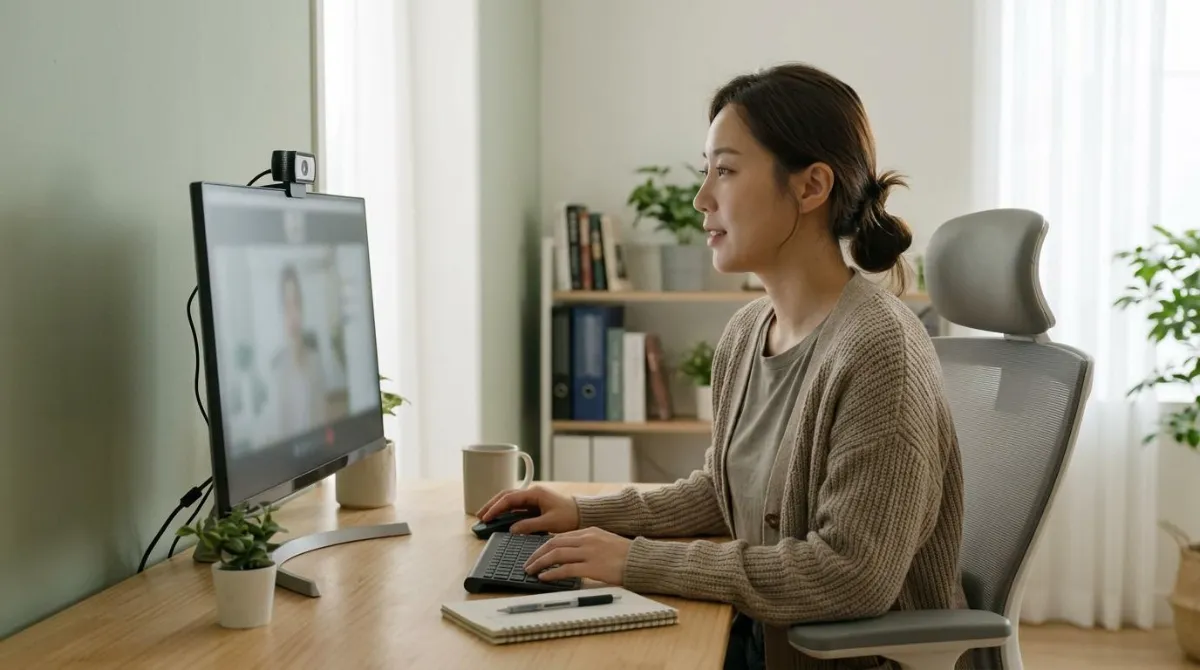
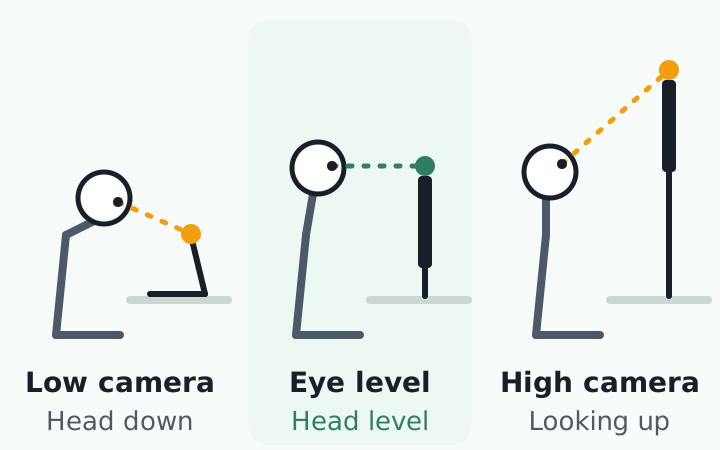
Set your webcam so the lens is at eye level or slightly above. At that height, the people on the call see your face straight on, and you can look at the screen without dropping your head. One camera height fixes your framing and your posture at the same time.
The usual problem is the laptop. Left flat on a desk, its built-in camera sits well below your eyes, so the call shows your chin and ceiling while your neck bends toward a low screen. This guide covers where the height rules come from, how much a laptop bends your neck, where to look, and what research says about video call fatigue.
Webcam height at eye level: what the guidance says
Screen height and camera height come from different sources, but they point to the same spot. Colorado State University's ergonomics guidance says to raise a laptop on a stand so the top of the screen is at or slightly below eye level, and to place the camera near eye level and directly in front of you for video meetings.1
The University of Queensland's Centre for Online Health, which trains clinicians to run video consultations, gives similar advice. Keep the camera close to eye level, put a USB webcam near the middle of the screen at the top or bottom, and fill the frame with your head and shoulders.2
| Source | Screen | Camera |
|---|---|---|
| Colorado State University1 | Top at or slightly below eye level | Near eye level, straight ahead |
| University of Queensland2 | Not specified | Near eye level, top or bottom center of screen |
| University of Cambridge Engineering3 | Laptop on a stand, nearer eye level | On top of the monitor, not down at keyboard height |
Put the two rules together and they meet. If the top edge of your monitor is at eye level, a webcam clipped onto it ends up a few centimeters above your eyes, which is exactly the "eye level or slightly above" spot that video call guides describe. Get the screen height right first and the camera usually follows.
The laptop camera problem: screen and keyboard are joined
A laptop welds the screen to the keyboard. Put the keyboard at elbow height and the screen and camera sit far below your eyes. Raise the screen and the keyboard rises with it. That conflict shows up in the numbers.
Researchers at the University of Newcastle in Australia used 3D motion capture on 30 people doing the same task on a desktop, a laptop, and a tablet. Compared with the desktop, neck flexion rose by an average of 10.92 degrees on the laptop and 16.92 degrees on the tablet.4 A follow-up in 22 people with chronic neck pain found the laptop added 7.19 degrees.5
| Change | Neck or head angle | Who and how |
|---|---|---|
| Desktop to laptop4 | Neck flexion up 10.92 degrees | 30 adults, 3D motion capture |
| Desktop to laptop5 | Neck flexion up 7.19 degrees | 22 adults with chronic neck pain |
| Plain laptop to riser plus external keyboard6 | Neck flexion down 4.53 degrees | 20 healthy men, 8-minute tasks |
| Laptop on desk to laptop on lap7 | Head tilt down 6 degrees more | 15 adults, motion analysis |
A riser plus a separate keyboard moves the numbers the other way. In one lab study, lifting the laptop screen and plugging in an external keyboard cut neck flexion by 4.53 degrees, lowered neck extensor activity by about 10 percent, and reduced reported discomfort.6 It was a short test with 20 healthy men, so treat it as a direction, not a promise for an eight-hour day.
Buying an external webcam and leaving it on the desk does not solve it either. Cambridge's engineering department notes that a webcam at keyboard level, while you look up at a screen, gives a very odd perspective.3 For laptop work, the baseline is a stand that lifts screen and camera together, plus an external keyboard. The step-by-step setup is in our laptop stand guide.
Camera too low or too high: framing and head position compared
Camera height changes what others see and how you sit. The Queensland guide warns that a low camera can give an unflattering view that includes the inside of your nose, and that sitting right under a ceiling light casts shadows under your eyes and nose.2
| Camera position | What others see | Your head and screen | Fix first |
|---|---|---|---|
| Laptop flat on desk (well below eyes) | Upward angle, chin and ceiling | Screen is low, head bends | Stand plus external keyboard |
| Eye level or slightly above | Face straight on, head and shoulders | Screen 10 to 15 degrees below eye line | Keep it |
| Far above eyes (tall monitor) | Downward angle, top of head | Screen may be too high | Check monitor height |
One honest caveat: we found no study that measured webcam height and neck posture directly. The evidence comes from screen-height and laptop studies. Because most webcams sit on the screen's edge, a low camera nearly always means a low screen.
A quick self-check works on any call. If your self-view shows a lot of ceiling, the camera is low. If it shows mostly the top of your head, it is high. Eyes near the upper third of the frame, with your shoulders in view, usually means you are close.
Where to look on a video call: put the window under the camera
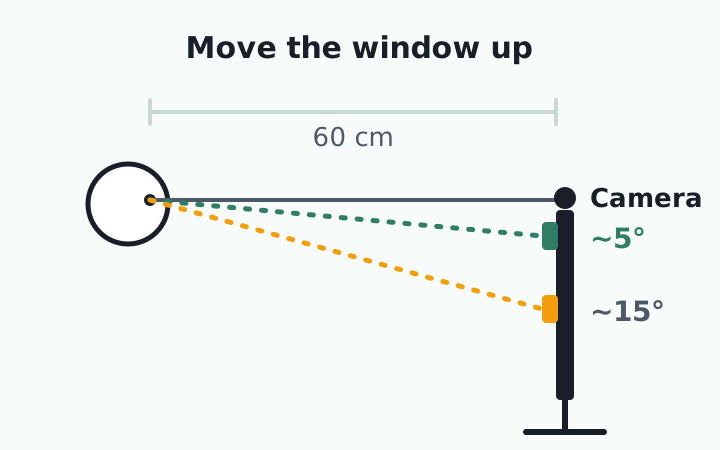
Even with the height right, a gap remains. The camera sits on the bezel while faces sit inside the screen. When you look at someone's face, your gaze misses the lens by that gap, and to them you seem to be looking down.
How big a gap shows? Taken together, studies from 1969 through 2023 put the point where eye contact is lost at about 4.5 degrees above and 5.5 degrees below the camera.8 Chen's 2002 experiments found people are an order of magnitude less sensitive to gaze that falls below their eyes than to gaze that goes left, right, or above.9 A 2025 study in which 17 viewers rated photos found that looking about 2 degrees below the lens read as eye contact better than looking straight into it.8
The findings do not all agree. Psychologists at Bielefeld University in Germany found that a slightly upward gaze looked most direct, with a tolerance of about plus or minus 4 degrees.10 The direction differs, but every study agrees that a few degrees change the impression. In a telehealth study where 53 observers compared photo pairs, a 7-degree gaze angle was judged to give better eye contact than a 15-degree one in 87 percent of comparisons.11
| Gap between camera and face | Gaze angle (calculated) | What studies suggest |
|---|---|---|
| 5 cm (2 in) | About 4.8 degrees | Near the eye contact threshold8 |
| 7 cm (2.8 in) | About 6.7 degrees | Judged better than 15 degrees in 87% of comparisons11 |
| 10 cm (4 in) | About 9.5 degrees | Likely to read as looking down |
| 16 cm (6.3 in) | About 15 degrees | Rated as weaker eye contact11 |
Those angles assume your eyes are 60 cm (about 24 inches) from the screen. The practical move is simple: drag the call window to the top center of the screen, right under the camera. Shrinking it instead of going full screen also cuts the oversized faces that Stanford researchers link to fatigue.12
Zoom fatigue: the four causes Stanford identified
Jeremy Bailenson, a communication professor at Stanford and founding director of the Virtual Human Interaction Lab, laid out four reasons video calls wear people down in a 2021 paper.12 He describes the paper as a theoretical argument built on prior research, and notes the causes have yet to be tested directly.13
| Cause | Bailenson's suggestion |
|---|---|
| Constant close-up eye contact | Exit full screen, shrink the window, use an external keyboard for distance |
| Seeing yourself all day | Check your framing, then hide self-view |
| Staying inside the camera's field of view | Place the camera farther away, turn video off at times |
| Extra effort to send and read nonverbal cues | Take audio-only breaks and turn your body away from the screen |
Videoconferencing is a good thing for remote communication, but just think about the medium – just because you can use video doesn't mean you have to.
Jeremy Bailenson, Stanford University Department of Communication, Stanford Report, 2021
The third cause connects straight to posture. A fixed field of view keeps you planted in one spot, and Bailenson points to research showing people think better when they move.12 With the camera at eye level and a little farther back, you can lean against your chair or shift position and still stay in frame.
Follow-up work added numbers. In a Stanford survey of 10,322 people, 13.8 percent of women and 5.5 percent of men said they felt very or extremely fatigued after video calls, and the team found that the biggest driver of women's higher fatigue was heightened self-focus triggered by self-view.14 A two-week study of 81 employees in Germany and Israel, covering 988 meetings, found video meetings more draining than meetings held through other media, while meeting size and length did not change that gap.15
A one-minute check before your next call
When choosing a webcam, look at placement before specs. A 4K sensor does not help if the camera cannot sit at eye level. Whatever brand you consider, check these points.
- It clips securely on top of your monitor or fits a tripod
- The lens tilts up and down
- The field of view fits your head and shoulders when you sit alone
- It has a privacy shutter or an easy off switch
- Self-view shows your eyes near the upper third and your shoulders in frame
- The call window sits right under the camera and is not full screen
- No bright window behind you and no ceiling light directly overhead
- Self-view is hidden once framing looks right
- On calls longer than an hour, stand up and change position partway through
Breaks matter as much as setup. If your day is stacked with calls, schedule short pauses between them. Our desk break timing guide covers how often and how long.
For your daily routine: five minutes before your first call, open self-view and check your eye height and where the call window sits. Once a day is enough to make it a habit.
If neck or shoulder pain keeps going after calls end, or you notice numbness, tingling, or weakness in your arms or hands, or ongoing dizziness, do not write it off as a setup issue. See a doctor for a proper evaluation.
One camera height, two things fixed
A webcam near eye level gives the people on your call a straight-on view and gives you a screen you do not have to bow to. On a laptop, a stand and an external keyboard are the starting point, and moving the call window under the camera brings your gaze along.
The catch is that you forget your posture once a meeting pulls you in. While reading slides or taking notes, it is hard to notice your head drifting toward the screen. So the useful thing to build at your desk is a habit of noticing when your head moves forward and bringing it back.
RightPose AI is a Windows and Mac desktop app built for that noticing. It uses the same webcam you call on to check your posture briefly at a set interval (every 5 minutes by default), and alerts you on screen when you shift from the upright posture you registered into a forward-head position. Camera images are processed on your device and never leave it. Read more in how on-device processing works.
If you're building a better daily routine, start by registering your upright posture in front of that freshly leveled webcam.
RightPose AI is not a medical device. It is a habit tool that notices your posture and nudges you to reset and stretch.
FAQ
Should a webcam go above or below the monitor?
For a single desk, the top center of the screen usually works best. The University of Queensland's guide allows either the top or bottom middle of the screen and says centering is what helps create a sense of eye contact.2 Mounted below, the camera tends to drop under eye level and shoot upward.
Should I look at the camera or the screen during a video call?
Look toward the lens when you start speaking or make a key point. In a 2025 study, gaze about 2 degrees below the lens read as the most convincing eye contact.8 Staring at the lens nonstop means missing faces, so keep the call window right under the camera and move between the two.
Does turning the camera off reduce video call fatigue?
The research is mixed. A four-week field experiment with 103 employees found people were more fatigued on days the camera was on, especially women and newer employees.16 A separate survey of 55 workers found that watching yourself or turning the camera off had no significant effect, while feeling a sense of group belonging reduced fatigue.17
Is a laptop stand enough on its own?
A stand lifts the screen and camera, but the keyboard rises too, which hikes your shoulders and bends your wrists. Colorado State University advises pairing the stand with an external keyboard and mouse kept close to your body at about elbow height.1 For full height targets, see our monitor height guide.
References
- Laptop, Tablet and Smartphone Ergonomics
- Quick start to videoconferencing: A guide for health professionals
- Video conferencing setup and general etiquette
- Differences in posture kinematics between using a tablet, a laptop, and a desktop computer in sitting and in standing
- Posture during the use of electronic devices in people with chronic neck pain: A 3D motion analysis project
- The Effect of Adjusting Screen Height and Keyboard Placement on Neck and Back Discomfort, Posture, and Muscle Activities during Laptop Work
- Notebook computer use on a desk, lap and lap support: Effects on posture, performance and comfort
- Don't look at the camera: Achieving perceived eye contact in remote video communication
- Leveraging the asymmetric sensitivity of eye contact for videoconference
- Perception of direct gaze in a video-conference setting: the effects of position and size
- Perception of eye contact in video teleconsultation
- Four causes for 'Zoom fatigue' and their solutions
- Nonverbal Overload: A Theoretical Argument for the Causes of Zoom Fatigue
- Zoom fatigue worse for women, Stanford study finds
- Understanding "Zoom fatigue": A mixed-method approach
- The fatiguing effects of camera use in virtual meetings: A within-person field experiment
- Videoconferences more exhausting when participants don't feel group belonging
This article is for general information only and is not a substitute for medical diagnosis or treatment. If pain persists or worsens, consult a medical professional.