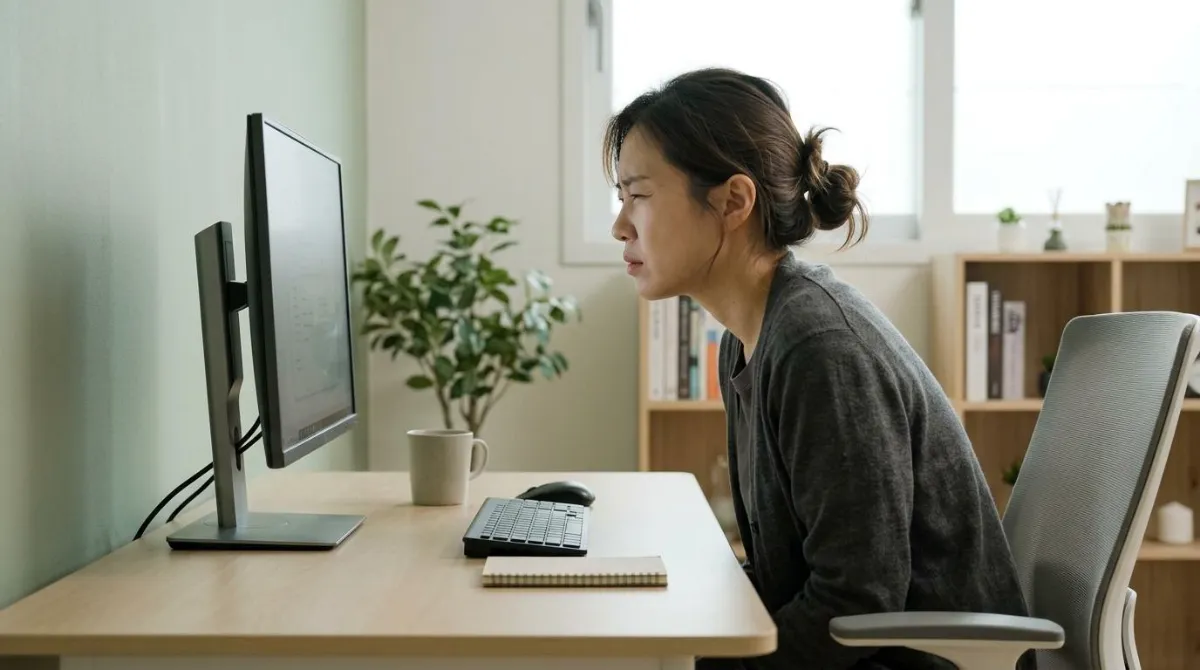
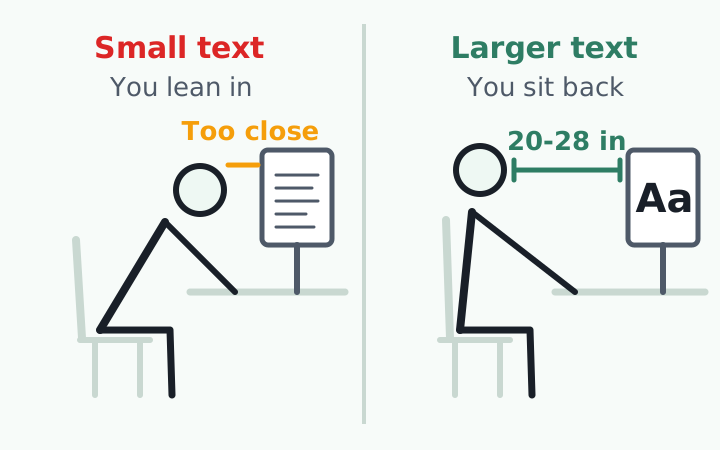
The fastest way to ease digital eye strain is to make the screen easy to read before you think about breaks. Put your monitor at about arm's length (roughly 20 to 28 inches) and enlarge the text until you can read it comfortably from there.23 When text is too small, your eyes work harder, your body drifts toward the screen and your head ends up in front of your shoulders.5
This guide covers where the distance numbers come from, how font size changes your posture, how much you blink at a screen and what the studies actually found about the 20-20-20 rule and blue light glasses. Where the evidence is mixed, you will see both sides.
Why eye strain and tech neck show up together
The American Optometric Association (AOA) lists eyestrain, headaches, blurred vision, dry eyes and neck and shoulder pain as the most common symptoms of computer vision syndrome, also called digital eye strain.3 Eye symptoms and neck symptoms share one list for a reason: when you can't see the screen well, you move your body until you can.
The AOA notes that some people tilt their heads at odd angles because their glasses aren't designed for computer distance, or bend toward the screen to see it clearly, and that these postures can lead to muscle spasms or pain in the neck, shoulders or back.3 That is the path from a vision problem to a posture problem.
Lab work backs this up. A study in David Rempel's ergonomics lab at UC Berkeley let people adjust their chairs and posture freely while only the font size changed. With smaller fonts, speed and accuracy dropped, eye and neck symptoms rose and viewing distance shrank.5
Most of the lost distance came from leaning in. Bending the torso forward accounted for 78% of it, scooting the chair forward for 4% and pushing the head forward alone for 3%. Glare on the screen also pushed people into neck flexion and sideways head positions.5 In the 2014 journal paper from the same experiment, each 1 mm increase in font size added about 3 correct responses per minute and 2% accuracy.6
How far should your monitor be from your eyes?
There is no single number. Eye care groups in the US cluster around arm's length, while some workplace rules set only a minimum. Here is what each group says in its own guidance.
| Source | Eye-to-screen distance | Screen position |
|---|---|---|
| American Academy of Ophthalmology | About 25 inches, roughly arm's length2 | Gaze slightly downward |
| American Optometric Association | 20 to 28 inches3 | Center of screen 15 to 20 degrees below eye level |
| Mayo Clinic | About an arm's length4 | Top of screen at or just below eye level |
| Rempel et al. lab trial | Between about 20 and 29 inches (52 to 73 cm) if text is near the limit of acuity7 | Not tested |
Real offices show the same pattern. Researchers in Hyderabad, India, measured the actual workstations of 114 staff. The 30 people with eye strain symptoms sat about 56 cm (22 inches) from their computers on average, versus 62 cm (24 inches) for people without symptoms.8
Phones followed suit: 30 cm versus 35 cm, and people who held their phones close also sat close to their computers. The authors caution that the correlation was weak and the study looked at a single point in time, so it can't prove cause.8 For monitor height, chair and desk numbers, see our home office desk setup guide.
Moving the screen back only works if the text grows too
Pushing the monitor away is not a complete fix by itself. In a 2007 Rempel trial, 24 people under 35 worked for 2 hours at each of three distances (about 52, 73 and 85 cm) while the text height stayed the same. At the farthest distance, people moved their torsos and heads closer to the screen.7
In that trial the near distance actually produced the least blurred vision, dry or irritated eyes and headache. The authors concluded that if character size is close to the limit of your visual acuity, the monitor belongs between roughly 52 and 73 cm.7 Distance and font size have to be set together.
Phones creep closer on their own. When 18 young adults read a novel on a smartphone for 60 minutes, the average distance was 29.2 cm, shrinking to 27.8 cm in the final 10 minutes. Symptom scores rose from 3.56 before reading to 8.06 after.9
Bigger text has trade-offs, too. A 2023 field study of 152 office workstations found that people habitually set their text well below the size the ISO standard recommends. When researchers enlarged it, participants rated their productivity 26% lower, partly because larger text clashed with tasks like viewing a whole spreadsheet, and text size was not linked to eye strain symptoms in that study.1 So enlarge text one step at a time until it reads easily, rather than jumping to the largest setting.
- Sit back against your chair and reach out: your fingertips should touch or nearly touch the screen
- From that position, check whether body text reads without effort. If not, raise the zoom or font size one step
- Look for windows or ceiling lights reflected on the screen, and tilt or move the screen if you see them
- If you wear glasses, notice whether you lift your chin or push your head forward to see the screen
Blinking and dry eye symptoms at the screen
The American Academy of Ophthalmology says people normally blink about 15 times a minute, but only about 5 to 7 times a minute while using computers and other digital screens.2 Each blink spreads tears over the eye's surface, so fewer blinks means faster drying.
| Study | Who and how | Blink rate |
|---|---|---|
| Patel et al. (cited in a review)10 | Before vs. during computer work | 18.4 down to 3.6 per minute |
| Tsubota and Nakamori (cited in a review)10 | Office workers, relaxed vs. viewing a display | 22 down to 7 per minute |
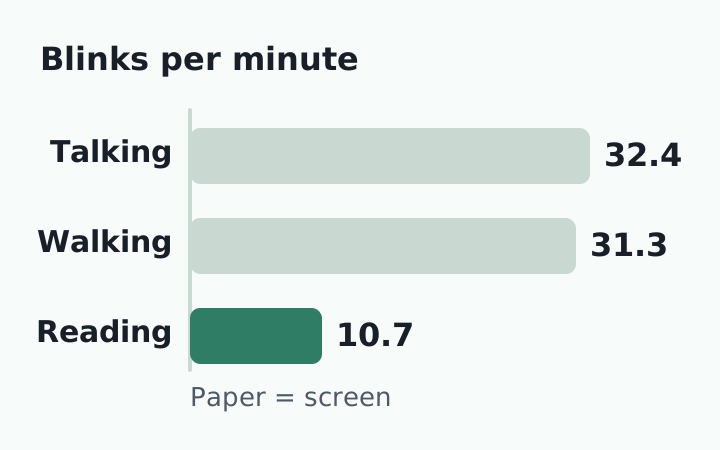
| IOVS 2023 randomized crossover11 | 24 students reading on paper, laptop, TV, phone vs. talking | 10.7 while reading vs. 32.4 talking; no difference between reading formats |
| Chu et al. 201412 | 25 people, same text on screen vs. paper for 20 minutes | 14.9 vs. 13.6 (no difference); incomplete blinks 7.02% vs. 4.33% |
The last two rows matter. Focused reading, not the screen itself, was what cut the blink rate.11 What did stand out on screens was a higher share of incomplete blinks, where the lid doesn't close all the way.12
If your eyes are consistently red, blurry or watery, or become sensitive to light or painful, see an ophthalmologist.2 Dry eye has several types and causes, and a self-check is not a diagnosis. Blurred distance vision that lingers after you stop screen work is also worth an exam.3
Does the 20-20-20 rule work? What the studies found
The 20-20-20 rule says: every 20 minutes, look at something 20 feet away for at least 20 seconds. Mayo Clinic and the AOA both recommend it.34 It was coined by San Diego optometrist Jeffrey Anshel as a catchy way to remember his "3-B" approach: blink, breathe and take breaks from near work.13
A 2024 review notes that Anshel himself says there is no scientific backing for the specific numbers.13 Researchers have since tested the rule directly, and the results point in different directions.
| Study | Who and how | Result |
|---|---|---|
| Talens-Estarelles et al. 202314 | 29 symptomatic computer users, break reminders for 2 weeks | Eye strain and dry eye symptoms dropped, tear film and eye surface measures did not change; benefit gone 1 week after reminders stopped |
| Johnson and Rosenfield 202315 | 30 young adults, 40-minute tablet reading, 20-second breaks every 5, 10, 20 minutes or none | No difference in symptoms, reading speed or accuracy |
Although widely cited as a treatment option, these results do not support the proposal of using 20-second scheduled breaks as a therapeutic intervention for digital eye strain.
S. Johnson and M. Rosenfield, SUNY College of Optometry, Optometry and Vision Science 2023 (abstract)
The two studies aren't directly comparable. The two-week study tracked real work and found people took more breaks with reminders, but it had no control group.14 The lab trial was tightly controlled but was one short session.15 The takeaway: the habit of looking away often seems to matter more than the exact 20-20-20 numbers.
The AOA also suggests resting your eyes for 15 minutes after two hours of continuous computer use.3 For ways to space out your breaks, see our desk break timing guide.
One small step for your daily routine: before you start work, reach out to check your screen distance and confirm that body text reads while you sit back. Five seconds at the start gives your whole day a baseline.
Do blue light glasses help with eye strain?
A 2023 Cochrane review, with Laura Downie of the University of Melbourne as senior author, pooled 17 studies with 619 people from six countries. It found that blue light filtering lenses may not reduce eye strain from computer use over the short term compared with regular lenses.16 The reviewers rated the certainty of that evidence as low, and follow-up was short.
The AAO also separates prescription computer glasses, which are set for screen distance, from blue light blocking glasses.2 Distance, text size, glare and blinking connect more directly to eye strain than the color of screen light does.3 If symptoms continue, an eye exam that checks your vision at your real working distance is a better next step than switching products.
Comfortable eyes, head back where it belongs
Put the screen about an arm's length away, size the text so it reads easily from there and look away from the screen often. That is where the research points. The exact 20-20-20 numbers have mixed support, and blue light glasses haven't shown a short-term benefit.
The catch is that knowing this doesn't mean you'll remember it. Once you're focused, it's hard to notice the moment your body leans in to read. What you can do at your desk is build a habit of noticing when your head drifts forward and bringing it back. For more on why that drift happens, see what causes text neck.
RightPose AI is a desktop app for Windows and Mac built for that noticing. You register your own good posture first. Then it uses your laptop or monitor webcam to check briefly at a set interval (every 5 minutes by default) and lets you know when your head has moved toward the screen. It also sends regular reminders to stand up and stretch, and camera images are processed only on your device.
If you're building a better daily routine, push your monitor back to arm's length and register your good posture today.
RightPose AI is not a medical device. It is a habit tool that notices your posture and nudges you to reset and stretch.
FAQ
How do I set the distance on a small laptop screen?
Laptops sit low and have small text, so it's easy to lean in. Raise the display zoom first, then consider an external keyboard so you can push the laptop back to arm's length. In lab studies, small fonts were what pulled people forward.5
Is dark mode better for eye strain?
We did not find direct evidence comparing dark mode and light mode for eye strain while writing this. The AAO advises matching screen brightness to the room and increasing contrast.2 Whichever mode you choose, pick the one where text looks sharpest.
Can screen time permanently damage your eyes?
The AAO says the idea that long screen use permanently damages your eyes is not true, though your eyes may feel uncomfortable if you stare too long.2 If blurred vision lingers after you stop, get an eye exam.3
Do I need special computer glasses?
Not everyone does. The AOA notes that glasses prescribed for distance or reading may not suit the 20 to 30 inch range of a computer screen, and that measuring your real working distance helps your eye doctor.3 Bring that measurement to your next exam.
References
- Analysis of real-world visual ergonomics at the visual display unit
- Computers, Digital Devices and Eye Strain
- Computer vision syndrome
- Eyestrain: Diagnosis and treatment
- Effects of Computer Display Design on Health and Productivity
- Effect of font size and glare on computer tasks in young and older adults
- The effects of visual display distance on eye accommodation, head posture, and vision and neck symptoms
- At what distance should digital devices be viewed?
- Viewing distance and eyestrain symptoms with prolonged viewing of smartphones
- Digital eye strain: prevalence, measurement and amelioration
- Blink Rate Measured In Situ Decreases While Reading From Printed Text or Digital Devices, Regardless of Task Duration, Difficulty, or Viewing Distance
- Blink patterns: reading from a computer screen versus hard copy
- Digital Eye Strain: Updated Perspectives
- The effects of breaks on digital eye strain, dry eye and binocular vision: Testing the 20-20-20 rule
- 20-20-20 Rule: Are These Numbers Justified?
- Blue-light filtering spectacle lenses for visual performance, sleep, and macular health in adults
This article is for general information only and is not a substitute for medical diagnosis or treatment. If pain persists or worsens, consult a medical professional.