RightPose AI ad placements

Health-conscious
in front of office workers
Advertise

Your banner runs on the screens of RightPose AI, a posture app that stays resident on the user's PC.
Just pick a placement and dates — dozens of impressions a day in a high-focus environment.

Apply after signing in · first come, first served, 3 advertisers per slot · runs start the day after application

From 1 day
Minimum purchase unit
From a single day, on your terms.
Small-budget tests are welcome, too.
3 advertisers
Max competition per placement
Exclusive placement, no clutter.
High-quality impressions.
D+1
Placement start date
Review starts as soon as payment is made.
you can start running quickly.
AUDIENCE

These people
use RightPose AI

Active users who care about their health and installed the app themselves. In a standalone app with no ad or content feed, your ad appears on screen dozens of times a day.

Remote workersIT developersoffice workersCivil-service and exam candidates
Active users with purchasing power
A segment that pays out of pocket for a health app. They respond especially well to health, productivity, IT, and employee-wellbeing brands.
AD FORMATS

2 ad formats

Your ad runs in a natural spot within the app screen. Each format has its own moment of exposure and specs.
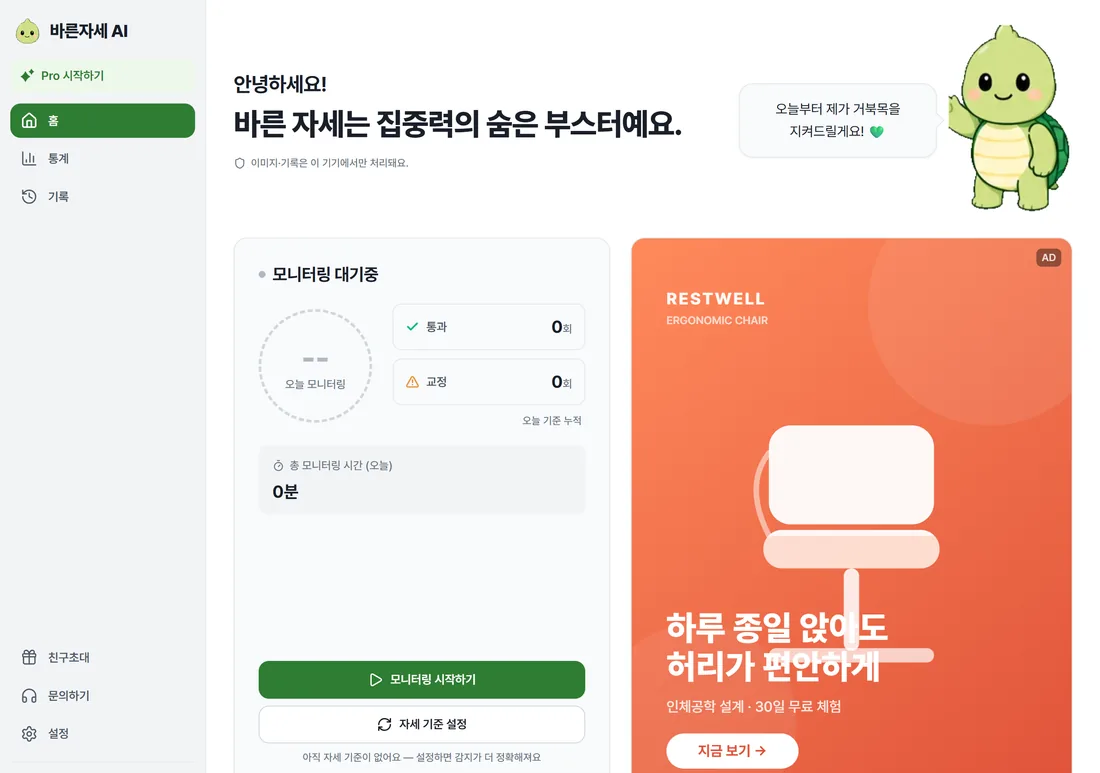
Home banner
Dashboard home banner
A vertical (4:5) banner shown on the first screen when the app launches. The most visible main slot.
Actual app screen where the Home banner ad is shown
Actual app screen — shown in the vertical banner slot on the right
Recommended 800×1000 (4:5) · JPG/PNG · max 2MB · up to 3 ads rotate per day
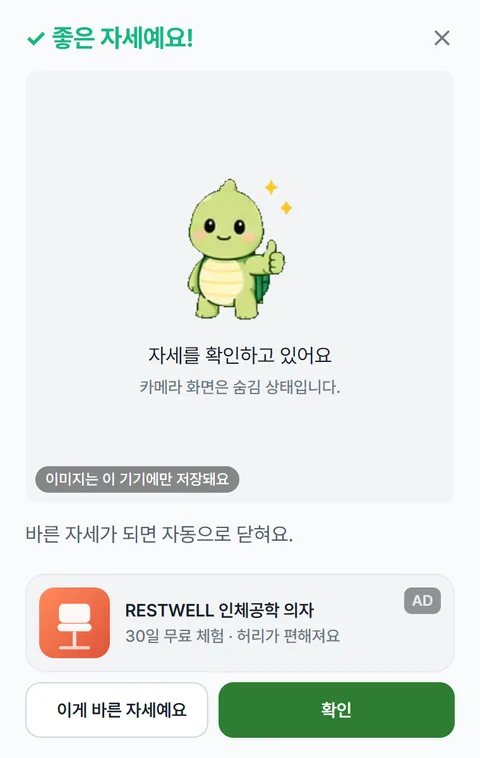
Monitoring popup
Posture check popup
A banner shown alongside the posture check popup. The moment of highest attention during app use.
Actual app screen where the Monitoring popup ad is shown
Actual popup screen — shown in the horizontal banner slot at the bottom
Recommended 1200×300 (4:1) · JPG/PNG · max 2MB · up to 3 ads rotate per day
PROCESS

How to apply

Takes about a minute after signing in.

01
Choose placement and dates
Choose the Home banner or the Monitoring popup, then pick the placement dates on the calendar. You can add multiple dates at once.
02
Upload banner image
Once you upload an image, the crop editor automatically guides you to the app's specs. JPG · PNG, up to 2MB.
03
Payment, then review → placement
Once payment is complete, your ad is registered as pending review. If approved, it runs from the day after you apply.
FAQ

FAQ

Get started now

Sign in, pick a slot, dates, and banner — that's it.
Start from as little as 1 day and test with a small budget.

Apply after signing in · first come, first served, 3 advertisers per slot · runs start the day after application